
Most TikTok caption ideas on the internet are just vibes.
“main character energy.”
“pov: you needed this.”
“wait for it.”
“this changed everything.”
Those can work sometimes, but they do not help when you are managing a real posting workflow: short-form videos for TikTok, Reels, Shorts, Threads, LinkedIn, maybe Pinterest too.
A useful TikTok caption has a job. It should make the video easier to understand, easier to find, or easier to respond to.
This guide gives you 75 TikTok caption ideas you can copy, but more importantly, it shows you how to turn one rough idea into a caption you can actually schedule across platforms without sounding like a generic caption generator.
If your next bottleneck is publishing, not writing, read our guide on how to schedule TikTok videos. If you are still choosing a tool, compare the best TikTok scheduling tools.
Quick answer: the best TikTok captions are specific, searchable, and easy to reply to
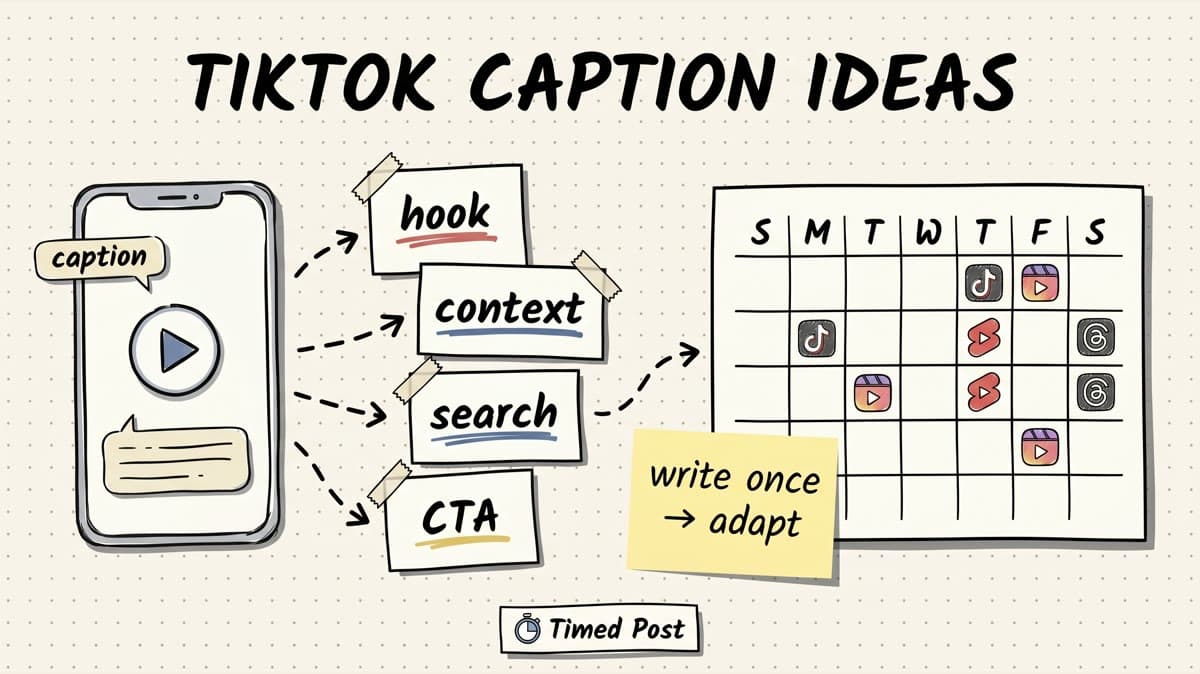
The best TikTok captions usually do one of five things:
| Caption job | What it does | Example |
|---|---|---|
| Hook | Gives people a reason to watch | “the mistake i made with my first client content calendar” |
| Context | Explains what the viewer is seeing | “posting this before-and-after because the old workflow was painful” |
| Search | Uses the words people would type | “how to batch TikTok videos for a full week” |
| Engagement | Makes replying easy | “which version would you post?” |
| CTA | Moves the viewer to the next step | “save this before your next batch day” |
The mistake is trying to make every caption “viral.”
A better target: make the caption obvious enough that the right person understands the video in two seconds.
TikTok’s own creative guidance talks about TikTok-first creative, hooks, sound, text overlays, and making videos fit the platform instead of feeling like generic ads. That applies to captions too. Your caption should support the video, not repeat everything the video already says. See TikTok For Business on creative best practices for the broader creative principle.
The simple TikTok caption formula
Use this when you do not know what to write:
[plain hook] + [specific context] + [search phrase or audience] + [tiny CTA]
Example:
posting across 5 platforms used to take me an hour. this is the batch workflow i use now as a solo creator. save it for your next content day.
That caption works because it has:
- a clear pain: posting across 5 platforms,
- a specific audience: solo creator,
- a content promise: batch workflow,
- a simple CTA: save it.
For short-form creators, social media managers, and founder-led accounts, this is usually better than a clever one-liner.
Use this checklist before scheduling:
- Does the first line explain why someone should care?
- Is there one keyword phrase a viewer might search?
- Does the caption match the actual video?
- Is the CTA natural?
- Would this still make sense if someone watches with sound off?
- Can this be adapted for Instagram, YouTube Shorts, Threads, or LinkedIn?
If you post the same video everywhere, do not copy the exact same caption everywhere. A TikTok caption can be looser. A YouTube Shorts caption can be more search-led. A LinkedIn version needs more context. Our multi-platform posting strategy guide shows how to adapt posts without rewriting from scratch.
75 TikTok caption ideas you can copy
Use these as starting points. Replace anything in brackets with your real topic, product, client, result, mistake, or workflow.
TikTok caption ideas for tutorials
- “how i [do the thing] without [annoying old workflow]”
- “the 3-step version of [topic] i wish i had earlier”
- “save this if you are trying to [specific outcome]”
- “beginner mistake in [topic]: [specific mistake]”
- “this is the simple way to [task] when you have no time”
- “watch this before you [common action]”
- “the checklist i use before [posting/editing/scheduling]”
- “one small fix that made [workflow] easier”
- “if [topic] feels confusing, start here”
- “here is the non-aesthetic version of how [thing] actually works”
Best for: screen recordings, workflow demos, explainers, content systems, editing tips, client work, and quick creator education.
TikTok caption ideas for behind-the-scenes videos
- “what [role] actually looks like on a normal day”
- “the part of [work] nobody records”
- “building this looked easy until [specific blocker]”
- “a realistic [morning/content/client] workflow”
- “this is what happens before the polished post goes live”
- “trying to finish [task] before [deadline]”
- “behind the scenes of [result]”
- “the messy middle of [building/creating/managing]”
- “day in the life, but it is mostly [unsexy task]”
- “not glamorous, but this is what keeps [system/account/business] moving”
Best for: founder updates, freelance social media manager content, agency work, AI creator workflows, editing sessions, and batch days.
TikTok caption ideas for product or SaaS updates
- “we shipped [feature] because [old workflow] was too annoying”
- “small update, big relief for anyone who [specific pain]”
- “before: [manual step]. now: [clean workflow].”
- “this feature exists because i got tired of [specific problem]”
- “building in public update: [feature] finally works”
- “not a huge launch, just a useful fix for [audience]”
- “the tiny product detail that saved me from [mistake]”
- “if you manage [number] accounts, this matters”
- “the unsexy feature that makes consistency easier”
- “i thought users needed [thing], but they actually needed [thing]”
Best for: product demos, founder build logs, changelogs, feature teasers, user-requested fixes, and simple before/after videos.
TikTok caption ideas for mistakes and lessons
- “i wasted [time/money] on [mistake] so you do not have to”
- “the wrong way i was doing [topic]”
- “i thought [belief]. i was wrong.”
- “this failed because i ignored [obvious thing]”
- “lesson learned after [specific event]”
- “do not copy this part of my workflow”
- “the mistake was not [surface problem], it was [real problem]”
- “what i would do differently if starting [thing] today”
- “this is why my first attempt at [topic] did not work”
- “i made [mistake] so now i check this every time”
Best for: founder stories, client lessons, content experiments, failed launches, editing mistakes, and workflow breakdowns.
TikTok caption ideas for engagement and comments
- “which version would you post?”
- “be honest: is this too much?”
- “what would you change in this workflow?”
- “is this normal or am i overcomplicating it?”
- “drop your version of [topic] below”
- “what is the most annoying part of [workflow] for you?”
- “would you rather [option A] or [option B]?”
- “i need a second opinion on this”
- “if you manage content, how do you handle [problem]?”
- “what tool are you using for [task] right now?”
Best for: comparison videos, content audits, design choices, content calendar planning, social media manager questions, and community-style posts.
TikTok caption ideas for AI creators and faceless channels
- “the prompt is not the hard part. the workflow is.”
- “turning one AI video idea into [number] platform posts”
- “faceless content still needs a real angle”
- “this is how i package one clip for TikTok, Reels, and Shorts”
- “AI made the asset, but i still had to fix [specific detail]”
- “the difference between an AI clip and a post people understand”
- “batching AI videos is easy until captions, thumbnails, and scheduling pile up”
- “the human part of my AI content workflow”
- “one video idea, three captions, three platforms”
- “this is the part of AI content nobody automates cleanly yet”
Best for: AI avatar videos, AI UGC tests, faceless channels, repurposed clips, prompt-to-post workflows, and creator operations content.
TikTok caption ideas for social media managers and agencies
- “client content day in [number] seconds”
- “how i organize [number] client posts without losing track”
- “the approval note i wish every client understood”
- “posting for clients is 20% content and 80% not mixing things up”
- “what i check before scheduling a client video”
- “the client asked for [thing], but the real issue was [thing]”
- “my simple workflow for turning one client video into multiple posts”
- “social media manager reality: [specific annoying task]”
- “the caption edit that made this client post clearer”
- “if you manage multiple brands, please do this before publishing”
Best for: freelance social media manager content, agency operations, client batching, approval workflows, and content calendar videos.
Short TikTok captions for simple posts
- “this is your sign”
- “saving this for later”
- “needed this yesterday”
- “tiny fix, big difference”
- “posting this before i overthink it”
Best for: trend posts, quick clips, reaction content, aesthetic videos, and casual creator posts where the video already carries most of the context.
Caption formulas by video type
If you are batch-creating content, formulas are faster than staring at a blank caption box.
| Video type | Caption formula | Example |
|---|---|---|
| Tutorial | “how to [result] without [pain]” | “how to schedule a week of TikToks without opening TikTok every morning” |
| Before/after | “before: [mess]. after: [clean result].” | “before: 6 browser tabs. after: one content calendar.” |
| Mistake | “i was doing [wrong thing] until [lesson]” | “i was writing captions last, then realized they should shape the edit.” |
| Product demo | “[feature] for people who [pain]” | “bulk scheduling for creators who post the same video everywhere.” |
| Opinion | “hot take: [specific POV]” | “hot take: captions should be written before the final edit.” |
| Question | “how do you handle [workflow]?” | “how do you handle TikTok captions when the same video goes to Reels too?” |
| List | “[number] ways to [outcome]” | “5 caption hooks for short-form videos that are not cringe.” |
| Saveable | “save this before [event]” | “save this before your next batch recording day.” |
This is also where a scheduler helps. You can draft captions in one focused session, then schedule them instead of trying to invent a caption five minutes before posting.
Timed Post is built for that exact workflow: draft once, adapt per platform, and schedule across TikTok, Instagram, YouTube, LinkedIn, X, Facebook, Threads, and Pinterest. If you are planning more than a few posts at a time, use bulk scheduling instead of manually rebuilding the same calendar every week.
Schedule your posts across every platform
Draft once, publish everywhere — automatically.
No credit card · Cancel anytime
How to adapt one TikTok caption for other platforms
A strong TikTok caption is not automatically a strong caption everywhere.
Here is a practical rewrite map:
| Platform | What to change | Example edit |
|---|---|---|
| TikTok | Keep it direct, hook-first, casual | “posting across 5 platforms used to take me an hour. this is the workflow now.” |
| Instagram Reels | Add a little more context and save/share language | “save this if you batch Reels and TikToks on the same day.” |
| YouTube Shorts | Make the searchable phrase clearer | “how to batch short-form videos for TikTok, Reels, and YouTube Shorts” |
| Add the business lesson | “The real cost of multi-platform posting is not writing. It is context switching.” | |
| X | Make it tighter and more opinionated | “copy-pasting captions across platforms is a silent productivity tax.” |
| Threads | Keep it conversational | “i still think captions are the most underrated part of repurposing short-form videos.” |
| Describe the outcome and visual topic | “Short-form video batching workflow for creators and social media managers.” |
If you want a deeper system, use the guide on how to schedule posts to multiple social media platforms at once. It covers the 7-tab workflow problem: uploading the same asset, rewriting captions, checking previews, and hoping you did not post the wrong thing to the wrong account.
A better workflow: write captions before batch scheduling
The usual broken workflow looks like this:
- Edit a video.
- Upload it to TikTok.
- Panic-write a caption.
- Copy it to Instagram.
- Realize the caption sounds wrong there.
- Rewrite it for Shorts.
- Forget what was already scheduled.
- Repeat tomorrow.
A cleaner workflow:
| Step | What to do | Why it helps |
|---|---|---|
| 1. Label the video | Tutorial, opinion, mistake, BTS, product demo, or question | Makes caption choice obvious |
| 2. Pick one formula | Use the table above | Avoids blank-page writing |
| 3. Write the TikTok version | Short, direct, native | Keeps the post platform-friendly |
| 4. Rewrite for 2-4 other platforms | Change context, not the core idea | Prevents copy-paste sludge |
| 5. Schedule the batch | Put everything on a calendar | Protects consistency without daily app-hopping |
| 6. Review before publishing | Check account, platform, caption, date, media | Prevents the expensive small mistakes |
This is the reason Timed Post cares about drafts and scheduling, not just “posting.” The value is not only that the post goes live. The value is that you can build a repeatable system.
If you are staring at a blank caption box, use the caption generator for a rough first pass, then clean it with the formulas above. When the caption is ready, use the hashtag generator to build a small, relevant tag set instead of dumping random viral tags under every video.
For more operations-heavy workflows, read 5 social media workflows that cut your workload in half and the guide to posting on Pinterest, TikTok, and Threads without the chaos.
What makes a TikTok caption feel native?
A native caption usually has these traits:
- It sounds like something a person would actually type.
- It does not explain the joke to death.
- It adds context the video does not already give.
- It uses keywords naturally, not like an SEO article stuffed into a caption.
- It gives viewers a simple action: comment, save, compare, try, watch, or share.
- It matches the energy of the video.
Avoid these:
| Weak caption habit | Why it fails | Better move |
|---|---|---|
| “Going viral soon” | Says nothing about the video | Name the result or pain |
| 15 unrelated hashtags | Looks spammy and unfocused | Use a few relevant terms |
| Same caption on every platform | Feels lazy outside TikTok | Adapt the angle per platform |
| Overly polished brand voice | Feels like an ad | Write like a creator, not a brochure |
| Caption repeats every word on screen | Wastes space | Add context or a CTA |
| No caption at all | Misses search/context | Add at least one clear phrase |
For video specs and formatting context, especially when repurposing to Instagram, use our guide to Instagram video length limits. Pairing the right caption with the wrong crop, length, or platform expectation still creates friction.
The caption batch template
Use this for a weekly short-form batch:
Video 1: [topic]
Type: [tutorial / mistake / product / BTS / opinion]
TikTok caption:
[caption]

Instagram caption:
[caption]

YouTube Shorts title/caption:
[caption]

Threads/X variation:
[caption]

CTA:
[save/comment/try/read/watch]

Scheduled date:
[date + time]
Then repeat for every video in the batch.
If you already know your best posting windows, schedule around them. If not, start with the broad guide to the best times to post on social media, then adjust based on your own account data.
The important part: do not make caption writing a daily emergency. Make it part of the batch.
FAQ
What is a good TikTok caption?
A good TikTok caption is short enough to scan, specific enough to add context, and clear enough to help the right viewer understand the video quickly. The strongest captions usually include a hook, one relevant keyword or topic phrase, and a natural CTA like “save this,” “which version would you pick?” or “try this before your next batch day.”
How long should a TikTok caption be?
Treat the visible first line as the most important part. TikTok caption limits and UI previews can change, but the practical rule stays the same: front-load the hook and do not hide the point at the end. Longer captions can work for context or search, but short captions are often better for simple trend, reaction, or visual-first videos.
Should TikTok captions include hashtags?
Yes, but hashtags should support the caption, not replace it. Use a few relevant hashtags that describe the topic, audience, or format. For example, a social media manager tutorial might use terms around content batching, TikTok tips, or social media workflow. Avoid stuffing a caption with unrelated tags just because they are popular.
Are TikTok captions important for SEO?
They can help. TikTok uses text signals such as captions, on-screen text, hashtags, and engagement to understand what a video is about. That does not mean you should write robotic captions. It means you should use the words your audience would naturally search while still sounding human.
Can I use the same caption for TikTok, Instagram Reels, and YouTube Shorts?
You can use the same core idea, but you should usually adapt the wording. TikTok can be casual and punchy. Instagram often benefits from save/share context. YouTube Shorts works better when the title or caption includes a clearer search phrase. LinkedIn needs more business context. A multi-platform scheduler helps you keep the same asset organized while changing the caption per platform.
What should creators do when they run out of caption ideas?
Stop starting from blank captions. Label the video type first: tutorial, mistake, product demo, behind-the-scenes, opinion, or question. Then use a formula for that type. You can also review old comments, customer questions, client feedback, and repeated workflow problems. The best captions usually come from real friction, not random caption lists.
Final checklist
Before you schedule your next TikTok, check this:
- The caption matches the actual video.
- The first line gives a reason to watch.
- The wording sounds like a human, not a brand deck.
- There is one natural search phrase.
- The CTA is simple.
- The caption can be adapted for other platforms.
- The scheduled post has the right account, date, media, and platform version.
Captions will not save a weak video, but they can make a good video easier to understand, easier to find, and easier to reply to.
That is the real win: not more caption ideas for the sake of it, but a repeatable workflow for turning short-form videos into posts that actually get shipped.


