The best X / Twitter scheduler for creators depends on what X is supposed to do in your content system.
If X is your main growth channel, you probably want a writing-first tool with thread previews, content inspiration, engagement workflows, and maybe automation around old posts.
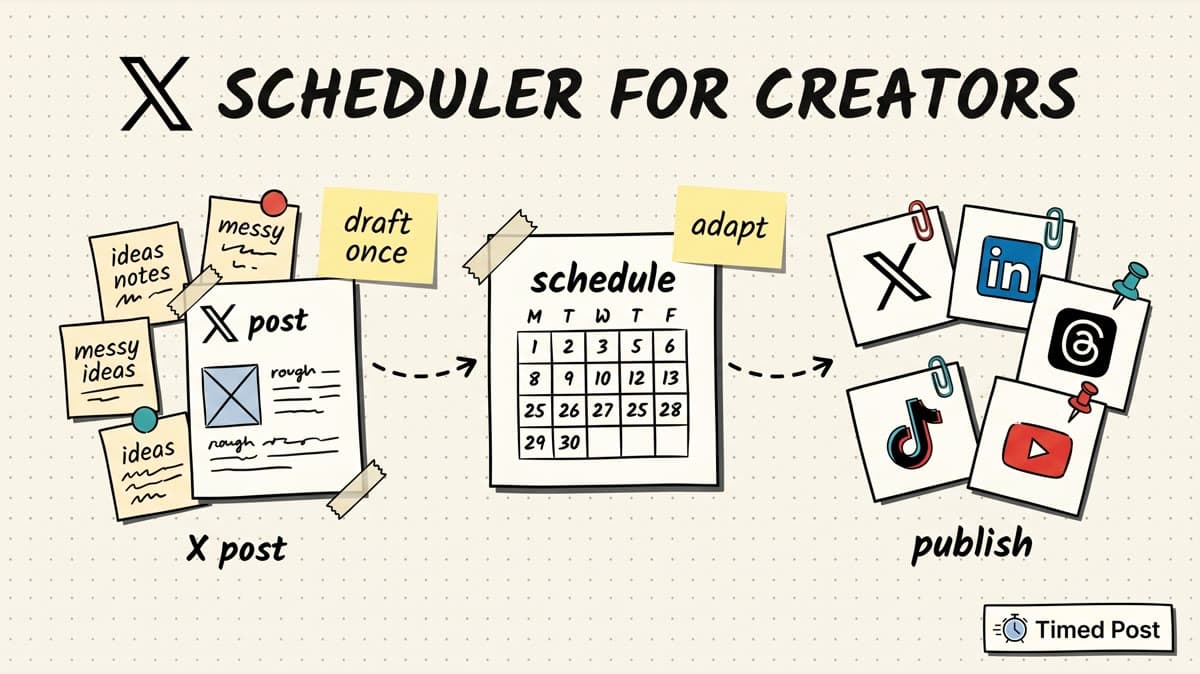
If X is one part of a bigger distribution system, you need something different: a scheduler that lets you draft once, adapt for every platform, and publish without opening eight tabs.
That second workflow is where most creators get stuck.
A founder writes a good X post in the morning. It should become a LinkedIn post, a Threads version, a short-form caption, maybe a Pinterest idea pin, and a post for the product account. Instead, it dies in the X composer because republishing it everywhere feels like a second job.
That is the real scheduling problem.
Not “can I schedule a tweet?”
The better question is: can I turn one creator idea into a clean publishing queue across X, LinkedIn, Threads, Instagram, TikTok, YouTube, Facebook, and Pinterest without copying the same caption into every platform?
If you need the broader workflow, start with our guide on how to schedule posts to multiple social media platforms at once. This article focuses specifically on choosing the right X/Twitter scheduler for creators.
Quick verdict
For creators who use X as one channel in a multi-platform content workflow, Timed Post is the best X / Twitter scheduler because it connects X scheduling to the rest of your publishing calendar.
You can plan an X post, adapt the idea for LinkedIn or Threads, attach media, drag it around the calendar, and keep the same campaign moving across all the platforms that matter. Timed Post supports X, Instagram, LinkedIn, Facebook, TikTok, YouTube, Threads, and Pinterest, so X does not sit in a separate tool from the rest of your creator stack.
But there is an honest tradeoff.
If you want a deep X-only growth tool with viral tweet libraries, auto-DMs, auto-plugs, advanced engagement queues, or a dedicated X CRM, tools like Hypefury and Tweet Hunter may fit better. If you want a polished writing editor for X, LinkedIn, and Threads, Typefully is strong. If you want a simple general scheduler, Buffer or Publer can work.
Here is the short version:
| Tool | Best for | Main X/Twitter strength | Main tradeoff |
|---|---|---|---|
| Timed Post | Creators posting on X plus several other platforms | One calendar for X, LinkedIn, Threads, Instagram, TikTok, YouTube, Facebook, and Pinterest | Not an X-only growth automation suite |
| Typefully | Writers building on X, LinkedIn, and Threads | Clean writing flow, thread-style composition, creator-friendly editor | Narrower platform coverage than all-in-one schedulers |
| Hypefury | X creators monetizing with automation | Evergreen posts, auto-plugs, engagement builder, X-heavy automation | More automation-heavy and more expensive than a simple scheduler |
| Tweet Hunter | X growth operators and personal brands | Inspiration library, X analytics, automation, CRM-style growth features | Can feel like a growth machine, not just a content calendar |
| Buffer | Simple multi-channel scheduling | Easy queue, broad platform support, trusted UX | Per-channel pricing can climb as accounts grow |
| Publer | Value-focused scheduling and bulk workflows | Bulk scheduling, recycling, many social channels | Interface and feature set can feel busy for pure writers |
| Metricool | Creators who care about analytics and reporting | Planner plus analytics/reporting across channels | Less writing-first than Typefully or X-native tools |
Pricing and feature pages were checked on May 30, 2026 from the public pages for Timed Post, Buffer, Typefully, Hypefury, Tweet Hunter, Publer, and Metricool. Always verify current pricing before buying because social scheduling plans change often.
What creators actually need from an X / Twitter scheduler
A basic scheduler lets you pick a date and time.
That is useful, but it is not enough for creators who use X seriously.
Creators need a scheduler that protects the whole content workflow:
| Need | Why it matters for X creators |
|---|---|
| Fast composer | X posts are often written from quick observations, product updates, or founder notes. The composer should not slow you down. |
| Character guardrails | Standard X posts need tight writing. A scheduler should make it obvious when a post is too long for the format you plan to publish. |
| Thread or long-post clarity | If threads or long posts matter to you, verify exactly how the tool handles them before relying on it. |
| Calendar view | Creators need to see launches, newsletters, product updates, and content themes together. |
| Platform variants | The X version should be sharper and shorter than the LinkedIn version. Threads may need a more conversational rewrite. |
| Media handling | Images, video clips, thumbnails, and links need to be checked before scheduling. |
| Queue and batching | Writing ten posts in one sitting is easier than forcing yourself to post manually every day. |
| Analytics | At minimum, you need enough signal to see what topics, formats, and posting windows are working. |
| Account safety | Automation should not push you into spammy behavior or post the wrong thing to the wrong account. |
This is why creators outgrow the native composer.
Native scheduling is fine when you have one account, one platform, and a small number of posts. But once you are repurposing ideas across platforms, managing a product account, or batching a week of content, you need a real operating system.
For a wider look at the category, read our breakdown of the best multi-platform social media scheduler. X is important, but for most creators it is no longer the only place content needs to live.
The 7 best X / Twitter schedulers for creators
1. Timed Post — best for creators who post beyond X
Timed Post is the best fit when X is part of your creator distribution system, not the entire system.
That is a very common creator workflow in 2026:
- a founder posts product updates on X,
- turns the same idea into a more complete LinkedIn post,
- makes a shorter Threads version,
- schedules a clip to TikTok, Instagram Reels, and YouTube Shorts,
- keeps a Facebook page or group alive,
- saves evergreen visuals for Pinterest.
The annoying part is not writing the first post.
The annoying part is moving the idea everywhere else without making mistakes.
Timed Post is built around that execution layer. You can draft content, adapt it per platform, schedule it on a drag-and-drop calendar, and keep the whole week visible in one place. It supports X alongside Instagram, LinkedIn, Facebook, TikTok, YouTube, Threads, and Pinterest.
That matters because X content often starts as raw founder notes:
- “we shipped the new analytics screen,”
- “first paid customer call today,”
- “I wasted three hours fixing OAuth,”
- “here is the mistake I made trying to grow from 0 users.”
Those posts work on X because they are direct and fast. But the same idea can usually become a LinkedIn reflection, a Threads conversation starter, a short video caption, or a weekly recap. If you only schedule inside an X-specific tool, the rest of the distribution is still manual.
Timed Post is strongest for creators who:
- post on X but also care about LinkedIn, Threads, Instagram, TikTok, YouTube, Facebook, or Pinterest,
- manage more than one brand or account,
- batch content weekly,
- need a clean calendar instead of scattered native drafts,
- want basic analytics without buying a heavy enterprise social suite,
- care more about shipping consistently than playing every X growth automation trick.
The workflow is simple:
- Draft the X version first.
- Keep the core idea intact.
- Rewrite the LinkedIn version with more context.
- Shorten or loosen the Threads version.
- Attach media where needed.
- Schedule the full campaign from one calendar.
If you regularly batch content, the bulk scheduling feature is the part to care about. Bulk scheduling is where creators save time: not from one scheduled post, but from turning 20 ideas into a full queue without touching every platform manually.
Best fit: creators, solo founders, AI creators, freelancers, and small teams using X as part of a multi-platform content engine.
Not best fit: creators who want deep X-only automation like auto-DMs, viral tweet libraries, or advanced engagement queues.
2. Typefully — best writing-first scheduler for X, LinkedIn, and Threads
Typefully is one of the strongest tools if the writing experience matters most.
Its public site positions the product around scheduling X posts, LinkedIn posts, and Threads posts. That tells you the category clearly: Typefully is not trying to be every social media management feature in one giant dashboard. It is built for people who write social posts seriously.
That makes it especially useful for:
- X threads,
- build-in-public updates,
- newsletter-style social writing,
- LinkedIn repurposing,
- solo creator content calendars,
- writers who want a cleaner editor than the native X composer.
The main advantage is focus.
When your content starts as text, the editor matters. You want to see the post clearly, work through drafts, and preview how the idea will read before it goes live. For creators who spend most of their time on X, LinkedIn, and Threads, that focus can be better than a huge all-platform scheduler.
The tradeoff is platform coverage.
If your creator workflow includes Instagram, TikTok, YouTube Shorts, Pinterest, or Facebook, Typefully may not remove the rest of your manual posting workflow. It can be excellent for text-led distribution, while still leaving video and visual channels elsewhere.
Best fit: writers, indie hackers, newsletter creators, and founders who mainly distribute through X, LinkedIn, and Threads.
Not best fit: creators who need one scheduler for all major social platforms.
3. Hypefury — best for X monetization and automation-heavy creators
Hypefury is built for creators who want more than a calendar.
The public pricing page emphasizes X-heavy features like long-post scheduling, auto cross-posting, viral thread hooks, tweet templates, auto-DMs, an engagement builder, watched users, watched terms, evergreen-style workflows, and monetization features.
That is a different category from a basic scheduler.
Hypefury makes sense if X is a business channel and you actively use automation to:
- resurface old posts,
- promote offers under successful posts,
- build reply lists,
- watch target accounts,
- turn X traffic into Gumroad or offer clicks,
- create repeatable growth workflows.
The upside is obvious: more X-specific leverage.
The tradeoff is complexity and intent.
Not every creator needs auto-DMs, auto-plugs, watched terms, or monetization automation. If your main problem is “I need to schedule my weekly founder posts and repurpose them to LinkedIn and Threads,” Hypefury may be more tool than you need.
It is also priced like a serious creator growth tool. The fetched public pricing page showed paid tiers starting above the cheapest general schedulers, with higher plans unlocking more accounts and automation capacity.
Best fit: X-first creators who monetize directly from X and want automation around engagement, evergreen posts, and offers.
Not best fit: creators who mainly want a simple multi-platform content calendar.
4. Tweet Hunter — best for X growth, inspiration, and analytics
Tweet Hunter is another X-first tool, but the positioning is slightly different from a normal scheduler.
Its public pricing page describes content creation, writing and scheduling, X analytics, automation, auto-DMs, auto-plugs, auto-retweets, an X CRM, and a large viral tweet library.
That makes Tweet Hunter useful when your problem is not just scheduling.
It is for creators asking:
- what should I write today?
- which hooks are working in my niche?
- how do I grow faster on X?
- which accounts should I engage with?
- how do I turn X engagement into leads?
- how do I systemize follow-up?
For personal brands, consultants, growth operators, crypto creators, and creators selling through X, those features can be valuable.
The tradeoff is that Tweet Hunter can feel like a growth machine.
That is not a bad thing if you want it. But if your brand voice is raw, casual, and founder-led, be careful not to let inspiration libraries and automation turn every post into the same polished X-growth template. Scheduling should help you ship. It should not make you sound like everyone else.
Best fit: X-first creators who want content inspiration, growth analytics, and automation.
Not best fit: creators who need balanced scheduling across X plus visual/video platforms.
5. Buffer — best simple scheduler with broad platform support
Buffer is still one of the easiest social schedulers to understand.
Its public pricing page highlights publishing, analytics, community, collaboration, AI assistance, API access, and integrations across platforms including Instagram, Facebook, TikTok, LinkedIn, X, YouTube, Threads, Pinterest, Google Business Profile, Bluesky, and Mastodon.
For creators, Buffer’s biggest advantage is simplicity.
You can connect channels, build a queue, and schedule posts without much setup. If you do not want X-specific growth automation and you do not need a complex approval workflow, Buffer can be a comfortable choice.
The tradeoff is pricing structure and depth.
Buffer commonly prices around channels, which can be fine for a creator with a small number of accounts. But if you manage a personal brand, product account, client account, and several platform channels, per-channel pricing can turn into a spreadsheet decision.
Example:
| Creator setup | Channels to price/manage |
|---|---|
| Personal brand on X, LinkedIn, Threads | 3 |
| Personal brand plus product account on X and LinkedIn | 5+ |
| Creator business across X, LinkedIn, Instagram, TikTok, YouTube, Threads, Pinterest | 7+ |
| Creator plus two clients or side projects | 12+ |
If you are comparing Buffer specifically, read the Timed Post Buffer alternative page before deciding. Buffer is strong, but creators who publish on many platforms should check account limits and pricing carefully.
Best fit: creators who want a reliable, simple, broad social scheduler.
Not best fit: creators who want X-specific growth automation or flatter pricing for many accounts.
6. Publer — best value-focused scheduler for batching and recycling
Publer is a strong general scheduler if your workflow is about volume, batching, and reuse.
The public pricing page highlights features like AI assistance, bulk scheduling, media integrations, content ideas, workspaces, analytics, recycling, a threads composer, browser extension, calendar planner, RSS feeds, and mobile scheduling.
For X creators, the useful parts are practical:
- schedule posts from a calendar,
- plan batches,
- recycle evergreen content,
- use a browser extension to capture ideas,
- manage multiple social platforms,
- work with a team or workspace if needed.
Publer can be especially useful if you have a large content backlog. For example, a creator with 200 old tips, quotes, product lessons, or content snippets may care more about recycling and bulk workflows than a perfect writing editor.
The tradeoff is focus.
Publer has many features. That can be powerful, but it can also feel busy if your main job is writing sharp X posts. Some creators want a calm writing environment. Others want a feature-dense scheduling dashboard. Choose based on how you actually work.
Best fit: creators who batch, recycle, and manage many posts across several platforms.
Not best fit: creators who want the cleanest X-native writing experience.
7. Metricool — best when X scheduling needs reporting attached
Metricool is worth considering when analytics and reporting matter as much as publishing.
A lot of creators eventually hit the same problem: they can post consistently, but they do not know what is actually working. X posts, LinkedIn posts, Reels, Shorts, TikToks, and Pinterest content all sit in different dashboards.
Metricool’s appeal is that it combines planning with analytics and reporting across channels. That can help if you need to review performance weekly, report to a client, or compare X results against other platforms.
For a solo creator, this may be more analytics than you need at first.
For a creator-agency hybrid, consultant, or freelancer managing client content, it can be useful. Reporting becomes part of the deliverable, not just something you check when a post goes viral.
The tradeoff is writing experience.
Metricool is not usually chosen because it has the most elegant X writing flow. It is chosen because planning, analytics, and reporting live together.
Best fit: creators, consultants, and social managers who need reporting across channels.
Not best fit: pure writers who mainly want a lightweight X composer.
X-only scheduler vs multi-platform scheduler
The easiest way to choose is to decide whether X is the center of your business or one part of distribution.
| Choose an X-only scheduler if... | Choose a multi-platform scheduler if... |
|---|---|
| X is your main acquisition channel | You publish on X plus 3+ other platforms |
| You write threads every week | You repurpose one idea into several formats |
| You need X-specific inspiration or CRM features | You need a single calendar for campaigns |
| Auto-DMs, auto-plugs, or evergreen tweets matter | Platform-specific variants matter more than automation |
| You judge success mostly by X growth | You judge success by total reach, leads, and consistency |
For most creators, the answer changes over time.
Early on, an X-only tool can help you build the habit. You write, schedule, study what works, and get faster.
But once you have a product, newsletter, YouTube channel, client work, community, or launch calendar, X becomes one input into a larger system. At that point, a multi-platform calendar is usually more useful than another X-only dashboard.
That is the reason Timed Post leans into “draft once, publish everywhere.” The value is not only posting to X. The value is not losing the idea after the X version is done.
For a deeper planning system, use our multi-platform posting strategy guide. It shows how to turn one idea into platform-specific posts instead of blasting the same text everywhere.
Schedule your posts across every platform
Draft once, publish everywhere — automatically.
No credit card · Cancel anytime
A practical X scheduling workflow for creators
Here is a simple workflow you can use with Timed Post or any serious scheduler.
Step 1: Create one weekly idea bank
Do not start inside the scheduler.
Start with raw inputs:
- product updates,
- customer questions,
- founder lessons,
- mistakes,
- screenshots,
- short clips,
- community replies,
- sales calls,
- old posts that still feel true.
A good creator idea bank is messy. That is fine. The scheduler should only get the ideas that are ready to become posts.
If you are posting as a solo founder, read our guide on social media schedulers for solopreneurs. The main lesson is simple: your system should reduce decision fatigue, not create another content chore.
Step 2: Draft the X version first
X is good for sharp, compressed ideas.
Write the direct version first:
- one observation,
- one lesson,
- one metric,
- one screenshot,
- one story,
- one question.
Avoid turning every post into a thread. Many creator posts work better as a single clean thought. If you do need threads or long posts, verify how your scheduler handles them before relying on it.
A practical rule: write normal X posts short enough that the platform format is not the bottleneck. If a post is too long, either tighten it or turn it into a different platform version.
Step 3: Build platform variants, not duplicates
This is where most creators get lazy.
The X version should not be copy-pasted everywhere.
Use the same idea, but change the format:
| Platform | Variant style |
|---|---|
| X | Short, direct, strong first line, one idea |
| More context, clearer story, practical lesson | |
| Threads | Casual, conversational, less polished |
| Caption tied to image, carousel, or reel | |
| TikTok / YouTube Shorts | Hook plus video context |
| Slightly warmer, community-friendly framing | |
| Search-friendly visual/title angle |
Timed Post is useful here because you can keep the campaign together while adapting each version. The goal is not to make every platform identical. The goal is to make one idea travel cleanly.
If you want a concrete example, our guide on social media workflows that cut your workload in half shows how batching and reuse reduce the manual tax.
Step 4: Schedule the week as a calendar, not a list
Queues are helpful, but calendars catch mistakes.
Before scheduling, check:
- are two launch posts too close together?
- did every platform get the right media?
- is the X version short enough?
- does the LinkedIn version need more context?
- are you posting the same hook three times in a row?
- did the right account get selected?
- are time zones correct?
For timing, use your own analytics first. If you do not have enough data yet, use broad benchmarks carefully. Our guide to the best times to post on Twitter/X can give you a starting point, but your audience behavior matters more than any universal posting hour.
Step 5: Review performance without overreacting
Do not rebuild your entire content strategy because one X post underperformed.
Look for patterns:
- founder stories vs tactical tips,
- product updates vs personal lessons,
- screenshots vs text-only posts,
- questions vs statements,
- morning vs afternoon posting,
- X-only ideas vs multi-platform ideas.
The win is not just a viral post.
The win is learning which ideas deserve to be reused across the full content calendar.
How to choose the best X / Twitter scheduler
Use this checklist before paying for any tool.
| Question | Why it matters |
|---|---|
| Do I mainly post on X, or across many platforms? | This decides between X-first tools and multi-platform schedulers. |
| Do I need thread-specific workflows? | Not every scheduler handles threads, long posts, or previews the same way. |
| Do I need automation like auto-DMs or auto-plugs? | If yes, look at X-growth tools. If no, avoid paying for complexity. |
| How many accounts/channels do I actually manage? | Per-channel pricing can become expensive as you grow. |
| Do I need analytics or just scheduling? | Growth-focused creators need more feedback loops. |
| Will I repurpose X posts to LinkedIn, Threads, video, or Pinterest? | If yes, prioritize platform variants and a calendar. |
| Does the tool help me sound like myself? | A scheduler should not turn your voice into generic creator content. |
The last point matters more than people admit.
A lot of X tools optimize for hooks, templates, and viral patterns. That can help, but it can also flatten your voice. If you are building trust as a founder or creator, the best scheduler is the one that helps you publish consistently without sanding off the human part.
Final verdict
If X is your main business and you want advanced X growth automation, start with Hypefury or Tweet Hunter.
If you mostly write for X, LinkedIn, and Threads, Typefully is one of the cleanest writing-first options.
If you want a simple general scheduler, Buffer, Publer, or Metricool can work depending on your pricing, workflow, and reporting needs.
But if you are a creator who posts on X and also needs to show up across LinkedIn, Threads, Instagram, TikTok, YouTube, Facebook, and Pinterest, Timed Post is the strongest fit.
It is not trying to be the most aggressive X automation machine. It is trying to solve the bigger creator problem: turning one idea into a full multi-platform publishing workflow without the 7-tab copy-paste mess.
Draft once. Adapt per platform. Schedule the week. Move on.
That is what a creator scheduler should do.
FAQ
What is the best X / Twitter scheduler for creators?
The best X / Twitter scheduler for creators depends on your workflow. Timed Post is best if you post on X plus several other platforms and want one calendar for everything. Typefully is strong for writing on X, LinkedIn, and Threads. Hypefury and Tweet Hunter are better if you want X-specific growth automation.
Can I schedule X posts without a third-party tool?
Native scheduling can work for simple X-only posting. A third-party scheduler becomes more useful when you batch content, manage multiple accounts, repurpose posts to other platforms, need analytics, or want a calendar view of your full content plan.
Is Timed Post an X-only scheduler?
No. Timed Post supports X, but it is built as a multi-platform social media scheduler. That makes it a better fit for creators who want to schedule X posts alongside Instagram, LinkedIn, Facebook, TikTok, YouTube, Threads, and Pinterest.
Which X scheduler is best for threads?
If threads are the center of your workflow, look closely at writing-first or X-first tools like Typefully, Hypefury, and Tweet Hunter. If you mainly publish short X posts and repurpose ideas across platforms, Timed Post may be a better fit because the broader calendar matters more than thread-specific tooling.
Which X scheduler is best for creators who also post on LinkedIn?
Typefully is strong if you mainly post text content on X, LinkedIn, and Threads. Timed Post is stronger if LinkedIn is only one part of a wider platform mix that also includes Instagram, TikTok, YouTube, Facebook, Pinterest, and other channels.
How often should creators schedule X posts?
Most creators should start with a realistic cadence they can maintain, such as one to three useful posts per day, then adjust based on analytics. Posting more only helps if the quality stays high. A scheduler should help you batch and review content, not push you into spammy volume.