
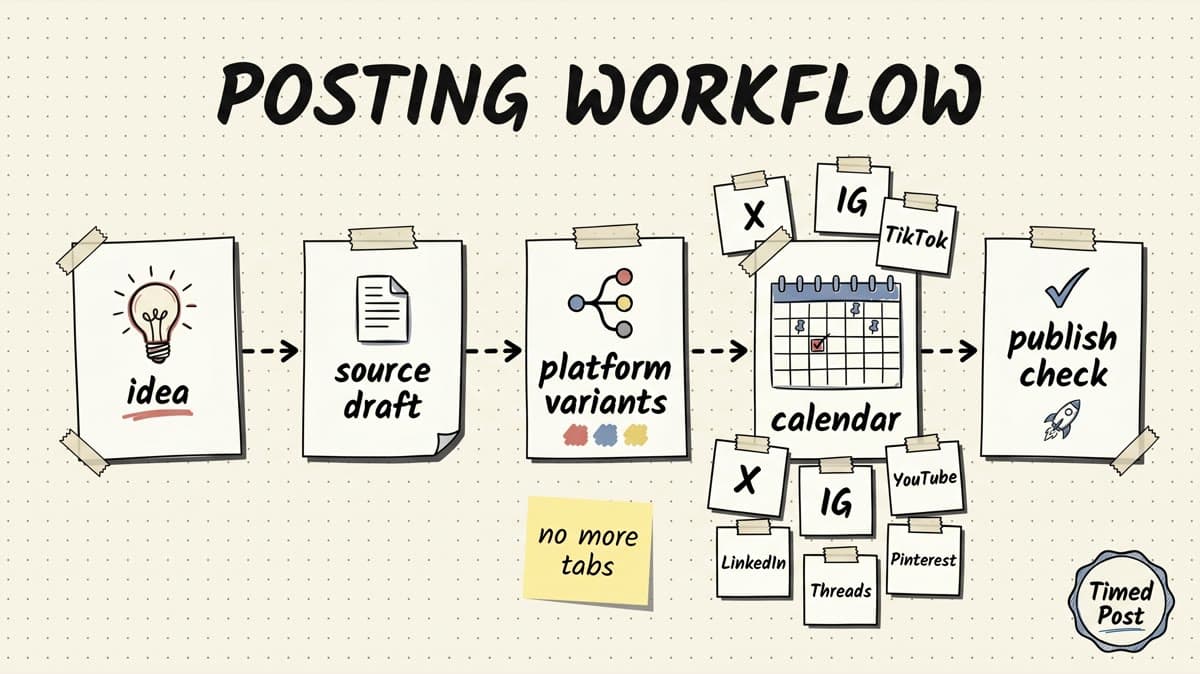
A good social media posting workflow should make posting feel boring.
Not lazy. Not generic. Just controlled.
If you create one post, open eight tabs, rewrite the caption from memory, upload the same media eight times, check three spreadsheets, then wonder if the LinkedIn version accidentally went to X, the problem is not discipline. The problem is the workflow.
Most creators do not need a 40-page social media operations manual. They need a repeatable system that turns one idea into platform-ready posts without losing the thread.
This guide gives you that system: a simple social media posting workflow for creators, founders, freelancers, and small teams who post across X, Instagram, LinkedIn, Facebook, TikTok, YouTube, Threads, and Pinterest.
If you only need the technical scheduling step, start with our guide on how to schedule posts to multiple social media platforms at once. This article covers the full workflow around scheduling: idea capture, platform variants, QA, calendar planning, publish checks, and reuse.
Quick answer: the best social media posting workflow
The simplest social media posting workflow is:
- Capture one source idea.
- Decide which platforms should get it.
- Turn the source idea into platform-specific variants.
- Attach the right media, links, hashtags, and CTA.
- Run a quick pre-publish QA check.
- Schedule everything from one calendar.
- Check publish status and reuse what worked.
That is the core loop.
The mistake is treating social posting like a clipboard task: write one caption, copy it everywhere, hope nothing breaks.
A better workflow treats each post as a small content asset with a source idea, platform versions, account selection, scheduled time, approval state, and post-publish status.
That sounds more structured, but it is faster once you post on three or more platforms because you stop rebuilding the same decision inside every app.
Why most creator posting workflows break
Most workflows break for boring reasons.
Not because the creator is bad at content. Not because the idea is weak. Usually because the execution layer is scattered.
The notes app has the idea. Google Docs has the longer version. Canva has the carousel. TikTok has a native draft. YouTube has a title. LinkedIn has the polished lesson. X has the raw founder version. Instagram has the visual caption. Somewhere in that mess, one post is approved and one is not.
Then the week gets busy.
The result is predictable:
- the wrong caption goes to the wrong platform,
- posts go live too close together,
- client and personal accounts get mixed up,
- old drafts stay in native apps,
- one channel gets ignored for two weeks,
- media files get uploaded again and again,
- failed posts are missed because nobody checks platform-level status.
A workflow fixes the handoff between idea, adaptation, scheduling, publishing, and review.
That is also why broad content strategy advice is not enough. Strategy tells you what to say. Workflow makes sure it actually gets posted in the right place.
If you are still building the strategic side, pair this with the multi-platform posting strategy guide. Then use the workflow below to ship the strategy without turning every post into admin work.
The 7-stage social media posting workflow
Use this as a lightweight operating system.
| Stage | Main question | Output |
|---|---|---|
| 1. Capture | What is the core idea? | Source draft |
| 2. Decide | Which platforms should get it? | Platform map |
| 3. Adapt | What needs to change per platform? | Post variants |
| 4. Package | What media, link, title, or CTA belongs with it? | Ready-to-schedule asset |
| 5. QA | What could go wrong before publishing? | Checked draft |
| 6. Schedule | When and where should it go live? | Calendar slot |
| 7. Review | What happened after publishing? | Reuse / improve note |
You can run this manually in a spreadsheet, inside a project management tool, or in a scheduler. The key is that every post moves through the same stages.
Timed Post is built for the scheduling and execution side of this loop: drafts, platform variants, workspaces, drag-and-drop calendar planning, bulk scheduling, analytics, and multi-platform publishing from one place.
It is not meant to replace your camera, video editor, or creative judgment. It replaces the messy part after the idea exists: copy, adapt, schedule, track, and repeat.
Stage 1: capture a source idea, not a final caption
Start with a source idea.
A source idea is the clean version of the post before it becomes platform copy. It does not need to be polished. It just needs enough information to adapt later.
A useful source idea includes:
- the point,
- the audience,
- the proof or example,
- the asset,
- the CTA,
- the platform priority,
- any deadline or campaign context.
Example:
We improved video scheduling this week so creators can prepare one vertical video and publish it across short-form platforms without rebuilding the post in every app. The point is not “automation for automation’s sake.” The point is avoiding the manual tax after the creative work is already done.
That is not a final caption.
It is the raw material.
From there, you can create a short X post, a more thoughtful LinkedIn version, an Instagram caption, a TikTok caption, a YouTube Shorts title, a Facebook post, a Threads prompt, and a Pinterest description.
The source idea prevents every version from drifting into a different message.
Good source draft fields
| Field | Example |
|---|---|
| Core idea | Creators lose time rebuilding the same post in every app |
| Audience | solo creators, AI video channels, founders, agency operators |
| Proof | 8 platforms need different captions, titles, formats, and publish checks |
| Asset | vertical video, carousel, screenshot, blog link, product update |
| CTA | ask for feedback, drive trial, invite reply, share resource |
| Priority platform | X for conversation, LinkedIn for authority, TikTok for discovery |
| Deadline | launch day, newsletter send, campaign date, client approval date |
This is small, but it changes the whole workflow. Instead of starting with “what should I post on LinkedIn?”, you start with “what idea am I distributing today?”
Schedule your posts across every platform
Draft once, publish everywhere — automatically.
No credit card · Cancel anytime
Stage 2: choose the job of each platform
Do not send every idea to every channel by default.
Some ideas should go everywhere. Some should only go to two or three platforms. Some should become a blog post first, then a social thread later.
Before adapting anything, choose the job of each platform.
| Platform | Best job in the workflow | What usually changes |
|---|---|---|
| X | Fast conversation, build-in-public notes, sharp lessons | shorter hook, simpler wording, fewer hashtags, optional question |
| Founder lessons, client proof, deeper explanation | stronger first two lines, more context, cleaner formatting | |
| Visual-first storytelling, carousels, Reels captions | caption tied to image/video, fewer link assumptions, stronger visual context | |
| TikTok | Discovery around a video idea | native caption, simple searchable phrasing, low-polish wording |
| YouTube Shorts | Search/browse discovery for short videos | title, short description, keyword clarity |
| Broader community/page context | clearer explanation, less platform-insider language | |
| Threads | Casual conversation and lightweight commentary | softer tone, shorter thought, question-led ending |
| Evergreen discovery | search-friendly title, description, board fit |
This one step prevents lazy cross-posting.
A creator posting workflow is not “copy this everywhere.” It is “decide what this idea should do on each platform.”
For example, a product update might be:
- X: raw build-in-public note,
- LinkedIn: what the build taught you,
- Instagram: screenshot or carousel story,
- TikTok: short behind-the-scenes clip,
- YouTube Shorts: search-friendly title around the lesson,
- Facebook: community update,
- Threads: casual question,
- Pinterest: evergreen workflow pin.
Same source idea. Different platform job.
If you manage more than one brand or client, this decision matters even more. Our guide on managing multiple social media accounts covers the broader account structure problem. The short version: platform choice and account choice should be explicit, not something you remember at the last second.
Stage 3: create platform variants in one place
Once the platform map is clear, write the variants.
This is where most creators fall back into tab chaos.
They open each native app, paste the rough draft, edit inside the platform, then lose track of which version is final. That is fine for one post. It gets painful when you batch a week.
A cleaner setup:
- Keep the source idea in one draft.
- Add the platforms/accounts that should receive it.
- Write each platform variant next to the others.
- Attach the same asset once if it applies.
- Adjust per-platform details before scheduling.
This is the part Timed Post is designed to make less annoying. You can draft once, build variants, and schedule across X, Instagram, LinkedIn, Facebook, TikTok, YouTube, Threads, and Pinterest without rebuilding the post in every app.
If the post belongs to a client or separate brand, use a workspace. If the post is part of a batch, place it directly on the calendar. If it is part of a larger upload, use bulk scheduling so the calendar gets filled without one-by-one manual work.
Variant checklist
For each platform version, check:
- Does the first line fit the feed?
- Is the caption length reasonable for that platform?
- Does the CTA make sense there?
- Are hashtags useful or just copied?
- Does the media format fit the channel?
- Does the link work where links are actually clickable?
- Is the account correct?
- Is the tone native, not pasted?
The goal is not to make eight totally different posts. That is too slow.
The goal is to preserve the same idea while changing the wrapper.
Stage 4: package the post before scheduling
A social post is rarely just text.
It usually has a media file, title, link, thumbnail, first comment, approval note, client context, or campaign tag. If those pieces live in different places, scheduling becomes fragile.
Package the post before it reaches the calendar.
Use this table:
| Asset | Workflow question | Common mistake |
|---|---|---|
| Text | Is each platform version ready? | One generic caption copied everywhere |
| Media | Is the right file attached? | Re-uploading or using the wrong crop |
| Title | Does the video/article need a search-friendly title? | Treating YouTube Shorts like an Instagram caption |
| Link | Does the CTA point to the right URL? | “Link in bio” pasted to platforms where it makes no sense |
| Hashtags | Are they platform-specific? | Instagram-style hashtag stack on LinkedIn |
| Account | Is this the right brand/client/profile? | Personal account gets a client post |
| Approval | Has the final version been reviewed? | Scheduling before feedback is resolved |
| Timing | Does it fit the calendar? | Everything goes live at the same minute |
For media-heavy posts, official platform rules can change. It is worth checking original docs for important constraints, especially with video. TikTok’s Content Posting API documentation and YouTube’s Shorts guidance are good examples of why a workflow should include a quick media check instead of relying on memory.
You do not need to obsess over every limit before every post. You do need one packaging step where obvious issues get caught.
Stage 5: run a 60-second pre-publish QA check
Most posting mistakes are preventable.
The problem is that creators usually check the creative quality and forget the operational quality.
Use this 60-second checklist before scheduling:
| Check | Why it matters |
|---|---|
| Account selected | Prevents client/personal mixups |
| Platform variant | Makes sure the right caption goes to the right channel |
| Media attached | Catches missing files, wrong crops, or inaccessible URLs |
| Hook visible | Protects the first line on LinkedIn, X, Threads, and captions |
| Link/CTA | Avoids broken links or platform-wrong wording |
| Date/time | Prevents accidental same-minute posting or timezone mistakes |
| Approval | Keeps client/team content from going live early |
| Platform status | Confirms each platform has a real scheduled/published result |
That last one matters after publishing too.
Do not treat a multi-platform post as successful just because the top-level workflow says “done.” Check the platform-level result where possible. A video might publish to one platform and fail on another because of account permissions, media rules, or API behavior.
This is especially important for creators who batch a lot of video. If TikTok is a major channel, the best TikTok scheduling tools guide is a useful companion because short-form publishing tends to expose platform-specific workflow issues faster than simple text posts.
Stage 6: schedule the calendar in batches
A workflow only saves time if it supports batching.
If you still schedule every post one at a time, the system is better than random posting but not much faster.
Batching means you sit down once and fill the calendar deliberately.
A simple weekly rhythm:
| Day | Workflow |
|---|---|
| Monday | Capture ideas from product work, client calls, community replies, videos, newsletters, and support questions |
| Tuesday | Choose the strongest ideas and build source drafts |
| Wednesday | Create platform variants and package media |
| Thursday | QA, approvals, and scheduling |
| Friday | Review results, replies, saves, comments, failures, and reuse candidates |
You do not have to follow those exact days. The point is separation.
Do not ideate, write, adapt, upload, schedule, and analyze every post in one scattered session. That creates context switching. It also makes you more likely to skip the boring checks.
A calendar view helps because you can see density:
- Are all posts going out on one day?
- Is LinkedIn empty this week?
- Did the client campaign collide with your founder post?
- Is every video going live at the same time?
- Are you repeating the same CTA too often?
For timing ideas, use the best times to post on social media as a baseline. Then adjust based on your actual analytics. Generic timing data is useful for starting, not for blindly running the calendar forever.
Stage 7: review what happened and reuse winners
The workflow does not end when the post goes live.
At minimum, review:
- which posts published successfully,
- which platforms failed or need retry,
- which hooks got replies,
- which posts got saves or shares,
- which platform variants underperformed,
- which ideas deserve a second version,
- which content should become a blog, email, carousel, or short video.
This is where many creators waste their own work.
They post a good idea once, get a few useful replies, then let it disappear. A strong workflow keeps winning ideas in circulation.
Example reuse loop:
| Original post | Reuse idea |
|---|---|
| X founder note gets replies | Turn replies into a LinkedIn lesson |
| LinkedIn post gets saves | Turn it into a carousel or blog outline |
| TikTok video gets comments | Make a follow-up Short/Reel answering the best question |
| Pinterest pin gets clicks | Create a more evergreen version of the same workflow |
| Client post performs well | Save it as a campaign template for similar accounts |
This is why analytics belong inside the workflow, not as a separate thing you remember once a month.
Timed Post includes analytics for reach, engagement, and growth so creators and teams can connect publishing with what happened afterward. The point is not vanity reporting. The point is making next week’s calendar easier.
Example workflow: one founder update across eight platforms
Here is what the workflow looks like in practice.
Source idea:
We shipped a scheduling improvement that makes it easier to plan one week of posts across multiple platforms from one calendar. The old workflow was writing in one place, uploading in another, then checking native apps to see what happened. The new workflow keeps drafts, variants, schedule, and status closer together.
Now turn that into platform variants:
| Platform | Variant |
|---|---|
| X | shipped a small scheduling improvement today. not flashy, but it removes one of the dumbest parts of posting everywhere: rebuilding the same post in 7 tabs, then checking each app to see what actually happened. boring workflow fix, but useful. |
| We shipped a scheduling improvement this week that reminded me how much social media work is not actually “content creation.” It is coordination: drafts, platform variants, media files, approvals, calendar slots, and post-publish checks. The feature is small on the surface, but the goal is bigger: make multi-platform posting feel less chaotic for creators and small teams. | |
| New workflow update: drafts, platform versions, and scheduling are easier to keep in one place now. Less tab switching. Fewer “did this actually go live?” moments. More time for the creative part. | |
| TikTok | social media scheduling sounds boring until you’re uploading the same video to 5 apps and checking all of them manually lol. trying to make that part less painful. |
| YouTube Shorts | Building a Better Workflow for Posting Everywhere |
| We improved the posting workflow so teams can plan content across multiple platforms from one calendar instead of rebuilding posts inside every native app. Small update, but it saves a lot of coordination time. | |
| Threads | tiny workflow update today: making it easier to keep drafts + platform versions + schedules together. social posting has too many tiny manual steps. |
| Multi-Platform Social Media Posting Workflow for Creators |
Notice what changed:
- X is raw and short.
- LinkedIn has context.
- Instagram supports the visual.
- TikTok sounds native.
- YouTube Shorts gets a searchable title.
- Facebook is broader.
- Threads is casual.
- Pinterest is evergreen.
That is the difference between repurposing and blind cross-posting.
Manual workflow vs scheduler workflow
You can run this system manually. A spreadsheet is better than chaos.
But once posting volume grows, a scheduler makes the workflow easier to maintain.
| Workflow setup | Works when | Breaks when |
|---|---|---|
| Notes app only | You post casually on one channel | You need platform variants, approvals, or calendar visibility |
| Spreadsheet + native apps | You have low volume and a strict checklist | Media uploads, status checks, and account selection become manual |
| Native platform schedulers | You only care about one or two platforms | You post across many platforms and want one calendar |
| Multi-platform scheduler | You post across several channels or clients | You still need creative input and platform-specific judgment |
A scheduler is not magic. Bad content scheduled perfectly is still bad content.
But a good scheduler removes the manual tax around good content: repeated uploads, scattered drafts, platform mixups, missed posting slots, and unclear status.
If you are comparing options, the best multi-platform social media scheduler guide gives a broader category breakdown. If you are a solo founder or creator, the social media schedulers for solopreneurs guide is a better fit.
A simple template you can reuse
Use this template for every post batch.
| Field | Fill this in |
|---|---|
| Source idea | What is the core point? |
| Audience | Who is this for? |
| Asset | Text, image, carousel, video, link, screenshot |
| Platforms | Which channels should get this? |
| Platform job | What should each channel do? |
| Variants | What changes per platform? |
| CTA | Reply, click, trial, save, share, comment, DM |
| Account/workspace | Which brand or client owns it? |
| Approval | Who needs to review it? |
| Scheduled time | When does each version go live? |
| Publish status | Did every platform publish correctly? |
| Reuse note | What should be reused next? |
This is intentionally simple.
The best workflow is the one you can run every week without needing motivation.
Where Timed Post fits
Timed Post is a social media scheduler for builders, creators, freelancers, social media managers, and small teams who need one posting workflow across multiple platforms.
It helps with the execution layer:
- create drafts,
- schedule posts,
- manage client/brand workspaces,
- use a drag-and-drop calendar,
- publish across X, Instagram, LinkedIn, Facebook, TikTok, YouTube, Threads, and Pinterest,
- bulk schedule content,
- track reach, engagement, and growth.
The honest tradeoff: Timed Post will not invent your entire content strategy for you. You still need a point of view, platform judgment, and real assets.
But once the idea exists, Timed Post helps turn that idea into scheduled, platform-ready posts without the eight-tab workflow.
That is the job.
Draft once. Publish everywhere. Automatically.
FAQ
What is a social media posting workflow?
A social media posting workflow is the repeatable process you use to turn content ideas into published posts. A good workflow covers idea capture, platform selection, caption variants, media packaging, QA, scheduling, publishing checks, and performance review.
What is the best workflow for posting on multiple social platforms?
The best workflow is to start with one source idea, decide which platforms should receive it, adapt the post for each platform, schedule everything from one calendar, and review platform-level publish status afterward. This prevents copy-paste mistakes while still letting you repurpose one idea across several channels.
Should I post the exact same thing on every platform?
Usually no. You can reuse the same core idea, but the wrapper should change. X, LinkedIn, Instagram, TikTok, YouTube Shorts, Facebook, Threads, and Pinterest all reward different formats, hooks, titles, and CTAs. Repurposing works better than blind cross-posting.
How often should creators batch social posts?
Most solo creators and founders should batch at least once per week. A weekly batch is enough to reduce daily context switching without locking the calendar too far in advance. Teams and agencies may batch two to four weeks at a time when campaigns, approvals, and assets are predictable.
What tools do I need for a social media posting workflow?
At minimum, you need a place to capture ideas, a way to store media, a calendar, and a scheduler. You can start with notes and a spreadsheet, but a multi-platform scheduler becomes useful when you manage several channels, accounts, clients, or content batches.
How does Timed Post help with social media posting workflows?
Timed Post gives you one place to draft, adapt, schedule, and track posts across X, Instagram, LinkedIn, Facebook, TikTok, YouTube, Threads, and Pinterest. It is useful when your main pain is not creating the idea, but turning that idea into platform-ready posts without repeated uploads, tab switching, and manual status checks.


