
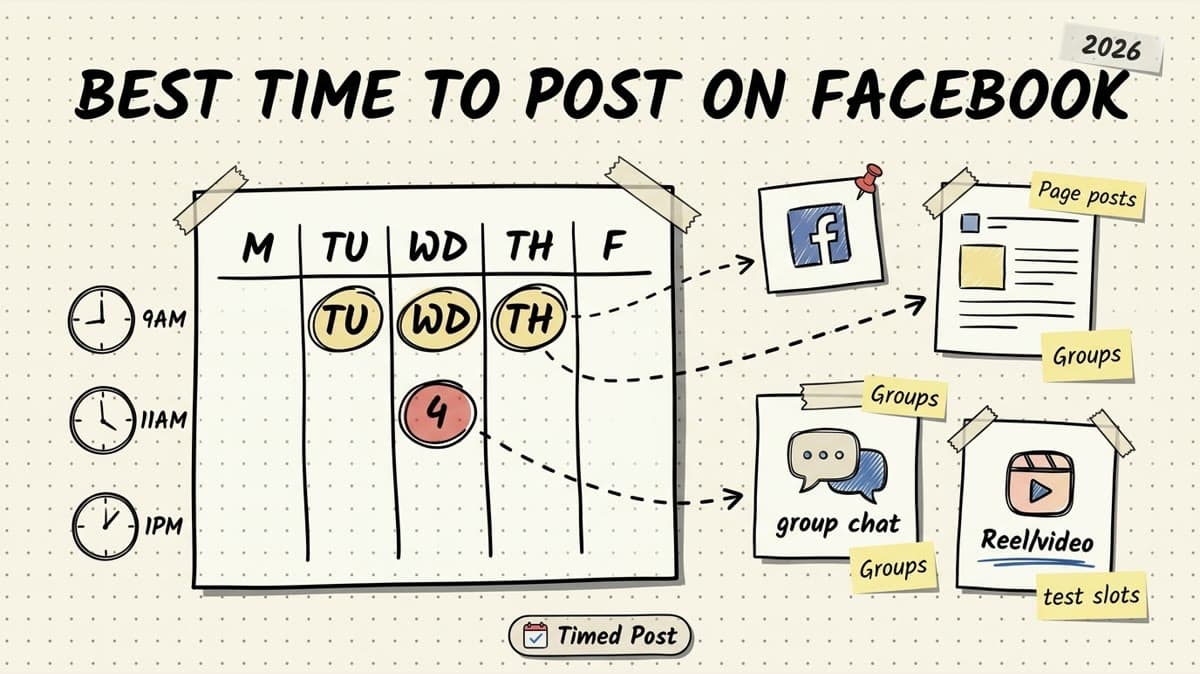
The best time to post on Facebook in 2026 is usually Tuesday through Thursday between 9 a.m. and 1 p.m. in your audience's local time.
That is the useful starting point.
But it is not the full answer.
Facebook is weird now because you are not posting into one clean feed anymore. A Page post, a Reel, a Group discussion, a local business update, and a boosted post can all behave differently. The same 11 a.m. slot that works for a B2B Page might do nothing for a restaurant, a creator, or an ecommerce brand with weekend shoppers.
So use the timing data as a starting test, not a religion.
Here is the practical version:
- If you have no data yet, start with Tuesday, Wednesday, and Thursday mornings.
- If you post to a Facebook Page, test business-hour and lunch windows first.
- If you post to a Group, test early evening when people have time to reply.
- If you post Reels, test lunch and after-work windows instead of only morning slots.
- If you manage multiple platforms, do not manually recreate the same timing test in 7 tabs. Build one calendar and adapt by platform.
That last part matters. The annoying part is not knowing that Wednesday at 11 a.m. is a decent Facebook slot. The annoying part is turning that into a real workflow when you are also scheduling Instagram, LinkedIn, TikTok, YouTube Shorts, Threads, Pinterest, and X.
If you need the broader cross-platform version, read the best times to post on social media guide. This article is the Facebook-specific version: timing windows, Page vs Group differences, what to test, and how to build a repeatable Facebook posting schedule.
Quick answer: best times to post on Facebook in 2026
Use this as your baseline if you do not have enough Facebook analytics yet.
| Day | Best starting window | Secondary window | Best for |
|---|---|---|---|
| Monday | 10 a.m.-12 p.m. | 5 p.m.-7 p.m. | Weekly updates, planning content, B2B posts |
| Tuesday | 9 a.m.-1 p.m. | 6 p.m.-8 p.m. | Page posts, links, Reels, educational posts |
| Wednesday | 9 a.m.-1 p.m. | 5 p.m.-8 p.m. | Most reliable test day for Pages and Groups |
| Thursday | 10 a.m.-2 p.m. | 6 p.m.-8 p.m. | Launch posts, community prompts, product updates |
| Friday | 9 a.m.-11 a.m. | 3 p.m.-5 p.m. | Lighter posts, local business updates, weekend promos |
| Saturday | 10 a.m.-12 p.m. | 6 p.m.-8 p.m. | Local, lifestyle, events, entertainment, food |
| Sunday | 6 p.m.-8 p.m. | none | Community posts, casual updates, next-week prep |
If you want the simplest Facebook posting schedule, start here:
| Posting frequency | Starter Facebook schedule |
|---|---|
| 2 posts/week | Tuesday 10 a.m. + Thursday 11 a.m. |
| 3 posts/week | Monday 11 a.m. + Wednesday 10 a.m. + Thursday 6 p.m. |
| 5 posts/week | Monday 11 a.m. + Tuesday 10 a.m. + Wednesday 12 p.m. + Thursday 6 p.m. + Friday 10 a.m. |
| Daily | Use weekday mornings as the core, then rotate evening/weekend tests. |
All times should be based on where your audience lives, not where you happen to be working from.
If most of your customers are in New York and you are scheduling from Morocco, schedule for New York. If you manage clients in different countries, build one workspace/calendar per brand or client so you do not mix time zones. That is the small operational mistake that creates the classic "why did this post go live at 3 a.m.?" problem.
The real best time depends on what kind of Facebook post you publish
Facebook timing is not one-size-fits-all because the platform has different consumption modes.
A link post asking someone to leave Facebook behaves differently from a short Reel. A community question behaves differently from a product announcement. A local restaurant post behaves differently from a SaaS founder update.
Here is the practical split.
| Facebook content type | Best windows to test first | Why |
|---|---|---|
| Page status updates | Tuesday-Thursday, 9 a.m.-1 p.m. | People check during work breaks and lunch. |
| Link posts | Tuesday-Thursday, 10 a.m.-12 p.m. | Better when people have enough attention to click and read. |
| Facebook Reels | Lunch, after work, early evening | Short-form video often works when people are scrolling casually. |
| Group posts | 7 a.m.-9 a.m. or 6 p.m.-8 p.m. | Members are more likely to reply before/after work. |
| Local business posts | Late morning + early evening | Useful for lunch/dinner/event planning. |
| Event posts | 2-7 days before event, late morning | Give people time to plan instead of posting last-minute. |
| Promos and offers | Thursday-Friday morning | People are closer to weekend purchase planning. |
This is why a Facebook scheduling guide should not stop at "post at 11 a.m." You need to know what the post is trying to do.
If the goal is comments, test Groups and evening windows. If the goal is clicks, test weekday mornings. If the goal is reach for a Reel, test lunch and evening slots. If the goal is local foot traffic, test the exact planning window before the purchase moment.
And if you are posting across multiple channels, use the Facebook timing as one layer inside a bigger multi-platform posting strategy. The same campaign might need Facebook at 10 a.m., LinkedIn at 8:30 a.m., Instagram at 6 p.m., and TikTok at 8 p.m. Copy-pasting one time across every platform is easier, but it usually leaves reach on the table.
Best day to post on Facebook
For most brands, the best days to post on Facebook are Tuesday, Wednesday, and Thursday.
Those days are boring in a good way. People are in their normal routines. They are not buried in Monday catch-up. They are not already mentally gone for the weekend. That makes midweek the safest default for Page posts, link posts, product updates, and educational content.
Here is the practical ranking:
| Rank | Day | Why it works |
|---|---|---|
| 1 | Wednesday | Strong all-around day for Page posts, links, and community prompts. |
| 2 | Tuesday | Reliable for educational posts, B2B updates, and campaign launches. |
| 3 | Thursday | Good for offers, launches, and pre-weekend awareness. |
| 4 | Monday | Fine for planning/reset content, but people are catching up. |
| 5 | Friday | Good earlier in the day; weaker later. |
| 6 | Saturday | Niche-dependent. Better for local, lifestyle, events, and entertainment. |
| 7 | Sunday | Usually not the best default, but can work for communities and weekly prep. |
The mistake is treating this ranking like a permanent truth.
If you run a local bakery, Saturday morning might beat Wednesday. If you run a B2B consulting page, Wednesday morning might win. If you run a private community, Sunday evening might work because people are planning the week.
Start with the ranking, then replace it with your own data.
Best time to post on Facebook Pages
For Facebook Pages, test 9 a.m. to 1 p.m. on Tuesday, Wednesday, and Thursday first.
Pages usually need early engagement to get distribution. If your post goes up when your audience is busy, asleep, or not in the mood to engage, it can die before it gets a real chance.
A simple Page test for the next 30 days:
| Week | Tuesday | Wednesday | Thursday |
|---|---|---|---|
| Week 1 | 9 a.m. | 11 a.m. | 1 p.m. |
| Week 2 | 10 a.m. | 12 p.m. | 2 p.m. |
| Week 3 | 11 a.m. | 9 a.m. | 6 p.m. |
| Week 4 | 12 p.m. | 10 a.m. | 7 p.m. |
Track these metrics:
- reach
- reactions
- comments
- shares
- link clicks
- profile/page visits
- saves, if available
- negative feedback, if visible in your reporting
Do not judge a time slot from one post. One weak creative can make a good slot look bad. Test each slot with multiple post types before calling it a winner or loser.
If you are still doing this manually in Meta Business Suite plus several other native schedulers, read the Facebook scheduling guide. Native tools are fine for basic Facebook-only posting. They get painful when Facebook is just one part of a bigger content workflow.
Schedule your posts across every platform
Draft once, publish everywhere — automatically.
No credit card · Cancel anytime
Best time to post in Facebook Groups
For Facebook Groups, test early morning and early evening before you rely only on business-hour slots.
Groups are conversation-driven. You are not just trying to get passive reach. You want replies.
That changes the timing.
Good Group windows to test:
| Window | Why it can work |
|---|---|
| 7 a.m.-9 a.m. | People check communities before work or during commute time. |
| 12 p.m.-1 p.m. | Quick lunch scroll; good for simple prompts. |
| 6 p.m.-8 p.m. | More time to reply thoughtfully. Strong for discussion posts. |
| Sunday 6 p.m.-8 p.m. | Good for weekly planning and community check-ins. |
The best Group posts are usually not polished brand updates. They are prompts people can answer quickly.
Examples:
- "What are you working on this week?"
- "What is one tool you stopped using recently?"
- "What is your current bottleneck with posting consistently?"
- "Drop your latest launch and I will give one sentence of feedback."
If you manage multiple communities or client accounts, the workflow matters more than the generic best time. You need a calendar that shows where each post is going, when it goes live, and which post needs a native tweak. That is the same problem behind managing multiple social media accounts: the strategy is simple; the operating system is what breaks.
Best time to post Facebook Reels
For Facebook Reels, test lunch, after work, and evening windows.
Reels are closer to passive scrolling behavior than traditional Page updates. Someone might not want to read a long link post at 8 p.m., but they might watch a 20-second video.
Start with these Facebook Reels slots:
| Slot | Best use |
|---|---|
| 12 p.m.-2 p.m. | Quick entertainment, tips, behind-the-scenes clips |
| 5 p.m.-7 p.m. | After-work scroll, creator content, brand personality |
| 8 p.m.-9 p.m. | Casual browsing, lifestyle, local, entertainment |
If you are repurposing vertical video across Facebook, Instagram, TikTok, YouTube Shorts, and Pinterest, do not pretend every platform wants the same caption, hashtags, and timing. The asset can be the same. The package should not be.
That is where bulk scheduling helps. Batch the video once, then adapt the caption and publish time per platform instead of uploading the same file repeatedly like a punishment.
A 30-day Facebook posting test you can actually run
Here is the simple version.
Do not try to find your perfect Facebook schedule in one week. Run a 30-day test.
Step 1: Pick 3 content types
Choose the formats you actually use.
For example:
- educational Page post
- short Reel
- community question
Or:
- product update
- customer story
- link post
Do not test 12 formats at once. You will create noise and learn nothing.
Step 2: Pick 5 time slots
Start with:
- Tuesday 10 a.m.
- Wednesday 12 p.m.
- Thursday 11 a.m.
- Thursday 6 p.m.
- Sunday 7 p.m.
This gives you weekday business-hour tests, one evening test, and one community/weekend test.
Step 3: Schedule the full month in one batch
This is where most people fail.
They do not fail because they picked the wrong time. They fail because the schedule lives in their head, a spreadsheet, three native tools, and a half-finished Notion doc.
The better workflow:
- Draft the Facebook version.
- Adapt the caption for the platform and audience.
- Add the creative.
- Pick the test slot.
- Put it on the calendar.
- Repeat for the month.
- Review results every Friday.
If Facebook is one of several channels, use a multi-platform social media scheduler so you can see the whole campaign instead of guessing what is live where.
Step 4: Compare slots by content type
Do not compare a funny Reel at 7 p.m. against a dry link post at 10 a.m. and conclude "evenings win."
Compare:
- Reel vs Reel
- link post vs link post
- Group prompt vs Group prompt
- product update vs product update
A spreadsheet is enough at first.
| Date | Time | Format | Topic | Reach | Engagement | Clicks | Notes |
|---|---|---|---|---|---|---|---|
| Tue | 10 a.m. | Page post | Tip | 1,240 | 37 | 12 | Strong comments |
| Wed | 12 p.m. | Link | Blog | 860 | 18 | 31 | Good clicks, low reactions |
| Thu | 6 p.m. | Reel | BTS | 2,900 | 96 | 4 | Strong reach |
After 30 days, keep the slots that repeatedly win for the job you care about.
Facebook timing mistakes that kill the test
The bad version of this strategy is copying a best-time chart, scheduling three posts, and declaring the chart wrong.
Avoid these mistakes.
Mistake 1: Using your own time zone instead of the audience's
If your audience is mostly in the US and you schedule for your own late-night workflow in another time zone, the post might land when nobody is paying attention.
Always schedule for audience local time.
Mistake 2: Testing too many variables at once
If you change the format, topic, offer, creative, caption length, and posting time at the same time, you cannot tell what worked.
Keep the format similar when testing slots.
Mistake 3: Treating Facebook like Instagram or LinkedIn
A LinkedIn thought-leadership post, an Instagram Reel, and a Facebook Group prompt do not need the same caption or schedule.
This is why a real content calendar should show platform-specific versions. If your calendar only says "post campaign Tuesday," it is not detailed enough.
Mistake 4: Posting links at the same time as videos
A link post needs attention. A Reel needs scroll behavior. They can both work on Facebook, but they should not automatically share the same test slots.
Mistake 5: Not batching
Manual posting makes timing tests harder because you have to be available at every slot.
Batching lets you run the test properly. That is the whole point of a scheduling workflow: set the system up once, then let the calendar execute.
How Timed Post fits this workflow
Timed Post is built for the annoying part: turning a timing strategy into a real publishing calendar.
The workflow is simple:
- Create the campaign draft once.
- Adapt the Facebook version instead of blindly copying the LinkedIn or Instagram caption.
- Choose the Facebook test slot.
- Add the other platform versions to the same calendar.
- Schedule everything from one place.
- Review what worked and repeat the winning slots.
That matters if you post on more than one platform.
A solo founder might need Facebook, LinkedIn, X, and Instagram. A creator might need Facebook Reels, TikTok, YouTube Shorts, Instagram Reels, and Threads. An agency might need several client workspaces with different schedules.
The worst version is seven tabs, seven uploads, seven caption tweaks, and one missed publish time.
Timed Post's angle is not "magic best time button." It is calmer than that: draft once, adapt per platform, schedule on a calendar, and stop paying the manual copy-paste tax.
If you are building a broader system, pair this Facebook guide with the social media workflow guide and the multiple accounts guide. Timing works better when the operating system around it is not chaos.
Facebook posting schedule examples
Here are a few realistic starting schedules.
Solo founder posting 3x/week
| Day | Time | Post type |
|---|---|---|
| Monday | 11 a.m. | Build update or lesson |
| Wednesday | 12 p.m. | Product/story post |
| Thursday | 6 p.m. | Question or short video |
Use this if Facebook is a secondary channel but you still want consistency.
Local business posting 5x/week
| Day | Time | Post type |
|---|---|---|
| Monday | 10 a.m. | Weekly update |
| Tuesday | 11 a.m. | Offer or product feature |
| Wednesday | 6 p.m. | Behind-the-scenes/Reel |
| Friday | 10 a.m. | Weekend promo |
| Saturday | 10 a.m. | Event/local post |
Local businesses should test weekends more seriously than B2B brands.
Agency managing client Pages
| Day | Time | Post type |
|---|---|---|
| Tuesday | 10 a.m. | Educational post |
| Wednesday | 12 p.m. | Link or case study |
| Thursday | 11 a.m. | Product/service post |
| Thursday | 6 p.m. | Video/Reel |
| Sunday | 7 p.m. | Community prompt, if relevant |
For agencies, the key is not only the best time. It is approval flow, client workspaces, and avoiding the "wrong caption on the wrong brand" problem. If that is your bottleneck, read the guide on how to manage 10 client accounts in 5 hours a week.
So, when should you post on Facebook?
Start with Tuesday, Wednesday, and Thursday between 9 a.m. and 1 p.m.
Then test:
- evening slots for Groups and discussion posts
- lunch and after-work slots for Reels
- Friday morning for weekend offers
- Saturday morning for local/lifestyle content
- Sunday evening for community and planning content
The best Facebook schedule is not the one you found in a chart. It is the one your audience proves after 30 days of consistent publishing.
The practical move is simple: pick 5 slots, schedule a month, track the results, and keep the winners.
If Facebook is part of a bigger content machine, do not run the test manually. Put it in a calendar, adapt the post per platform, and let the scheduler handle the boring part.
That is how timing turns into consistency.
FAQ
What is the best time to post on Facebook?
The best time to post on Facebook is usually Tuesday through Thursday between 9 a.m. and 1 p.m. in your audience's local time. Use that as a starting point, then test your own audience for 30 days.
What is the best day to post on Facebook?
The best days to post on Facebook are usually Tuesday, Wednesday, and Thursday. Wednesday is the safest all-around test day for many Pages, while weekends can work better for local, lifestyle, event, and community content.
Is morning or evening better for Facebook posts?
Morning and lunch windows usually work better for Facebook Page posts and links. Evening windows can work better for Facebook Groups, Reels, casual browsing, and community discussion posts.
How often should I post on Facebook?
Most brands should start with 3 to 5 Facebook posts per week. If you have enough content and a real workflow, daily can work. If posting daily lowers quality, post less and keep the schedule consistent.
Should I use the same posting time for Facebook and Instagram?
No. Facebook and Instagram can have different audience behavior, formats, and best posting windows. Use the same campaign idea if it fits, but adapt the caption, format, and publish time for each platform.
How do I find my own best time to post on Facebook?
Pick 3 to 5 time slots, schedule similar post types into those slots for 30 days, then compare reach, engagement, clicks, comments, and shares. Keep the slots that repeatedly perform best for the result you care about.


