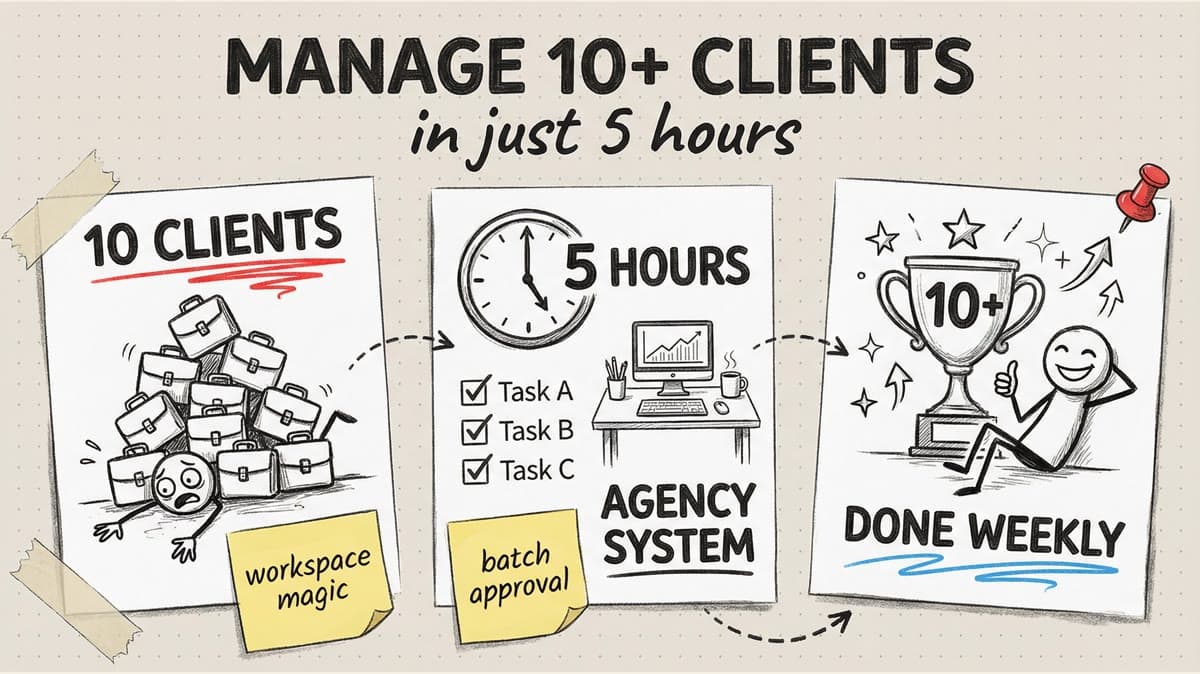
Managing 10 client social media accounts sounds impossible if you're used to the traditional approach: log into each platform daily, manually post, respond to comments, pull analytics, and repeat.
That workflow scales terribly. It works fine for 1-2 accounts. At 5 accounts, you're working overtime. At 10+? You either hire help or burn out.
But here's what most agencies miss: 80% of social media management is repetitive admin work that can be systematically eliminated. The actual strategic work (understanding clients, creating unique angles, building relationships) takes maybe 90 minutes per client per week.
The rest? Platform-switching, re-entering the same data, manual posting at specific times, pulling metrics from 6 different dashboards. Pure waste.
This guide breaks down the exact system agencies use to manage 10-20 client accounts in 4-6 hours per week without cutting corners on quality.
You'll learn:
- The workspace structure that prevents account mix-ups (Section 1)
- How to onboard a new client in 30 minutes (Section 2)
- The 20-minute weekly client workflow from planning to publishing (Section 3)
- Why most agencies waste 3+ hours per client on reporting (Section 4)
- The client communication system that eliminates endless revision cycles (Section 5)
The Math Problem: Why Traditional Management Doesn't Scale
Let's measure the damage. Traditional agency workflow for one client:
| Task | Time Per Client | 10 Clients | Weekly Total |
|---|---|---|---|
| Platform logins/switching | 15 min/week | 150 min | 2.5 hours |
| Manual content creation | 60 min/week | 600 min | 10 hours |
| Manual posting | 20 min/week | 200 min | 3.3 hours |
| Client communication (email/Slack) | 30 min/week | 300 min | 5 hours |
| Analytics and reporting | 45 min/week | 450 min | 7.5 hours |
| Revisions and approvals | 30 min/week | 300 min | 5 hours |
Total: 33+ hours per week for 10 clients
That's beyond full-time. And it assumes everything goes smoothly (no emergency requests, no approval bottlenecks, no platform issues).
The optimized workflow brings this down to 4-6 hours total. Here's the system.
Section 1: The Workspace Architecture
The single biggest productivity killer in multi-client management is cognitive switching. Your brain has to reload an entirely different brand voice, visual style, content strategy, and platform mix every time you switch clients.
The fix: Workspace isolation
Instead of managing all 10 clients in one chaotic dashboard, create separate workspaces for each.
Workspace setup in Timed Post:
Workspace 1: Client A (Real Estate Agency)
- Platforms: Instagram, Facebook, LinkedIn
- Brand voice: Professional, data-driven
- Posting frequency: 5x/week
- Content pillars: Market updates, seller tips, client success stories
Workspace 2: Client B (Coffee Shop Chain)
- Platforms: Instagram, TikTok, Facebook
- Brand voice: Casual, fun, community-focused
- Posting frequency: Daily
- Content pillars: Behind-the-scenes, new products, customer spotlights
Workspace 3: Client C (B2B SaaS)
- Platforms: LinkedIn, X, YouTube
- Brand voice: Thought leadership, technical
- Posting frequency: 3x/week
- Content pillars: Industry insights, product updates, how-to guides
Why workspace isolation matters:
- No more account mix-ups: You can't accidentally post Client A's professional content to Client B's casual TikTok
- Instant context switching: Open Workspace 2, your brain knows "coffee shop mode, casual tone"
- Client-specific templates: Each workspace has its own Canva templates, hashtag sets, and brand assets
- Clean client handoffs: If a team member takes over a client, you just grant them access to that workspace
Workspace naming convention:
Use a consistent format: [Client Name] - [Industry]
Examples:
- "Blue Sky Realty - Real Estate"
- "Roast & Toast - F&B"
- "DataFlow - B2B SaaS"
This makes it visually impossible to confuse clients, even when you're managing 20+.
Time saved: 2-3 hours/week from eliminating context confusion and account mix-ups.
Section 2: The 30-Minute Client Onboarding Checklist
When you sign a new client, the setup process determines whether they'll be easy to manage or a constant headache.
A sloppy onboarding means you'll spend the next 6 months asking "What's your Instagram password again?" and "Can you resend your logo?"
The 30-minute onboarding workflow:
Step 1: Onboarding form (client completes before kickoff call) - 10 min for them
Send a Google Form or Notion template asking:
- Social media account URLs (Instagram, TikTok, LinkedIn, etc.)
- Brand assets (logo, color codes, fonts)
- Content pillars or themes they want to focus on
- Posting frequency preference (3x/week, daily, etc.)
- Approval process (does everything need review, or can you auto-publish?)
- Off-limits topics (politics, religion, competitors)
Step 2: Platform connections (during kickoff call) - 10 min
While on Zoom with the client:
- Have them grant access to their social accounts (OAuth, not passwords)
- Connect accounts to your scheduler
- Confirm everything is linked correctly
Why during the call: If anything goes wrong ("Instagram won't connect"), you troubleshoot together instead of 5 back-and-forth emails.
Step 3: Workspace setup - 5 min
- Create a new workspace named after the client
- Add connected accounts to that workspace
- Upload brand assets (logo, brand colors) to the workspace library
- Create 2-3 Canva templates in their brand style
Step 4: Content calendar setup - 5 min
- Define content pillars based on onboarding form answers
- Map pillars to a weekly rhythm (Monday: tip, Wednesday: behind-the-scenes, Friday: engagement post)
- Pre-schedule the first week's content (even if it's placeholder text)
Post-onboarding deliverable:
Send the client a link to their workspace (view-only access) showing:
- The first week's content already scheduled
- The calendar for the next 30 days with themes outlined
This builds instant confidence: "They got started before we even hung up the call."
Time saved: 2-3 hours per client from preventing "where's that file?" and "can you remind me?" later.
Section 3: The 20-Minute Weekly Workflow Per Client
Once a client is set up, ongoing management should be ruthlessly efficient. Here's the weekly system:
Monday: 20-minute batching session per client
You'll cycle through all 10 clients in a 3-4 hour block Monday morning. Each client gets 20 focused minutes.
Minutes 1-3: Review and plan
- Open client's workspace
- Review last week's performance (which posts did well?)
- Check content calendar for this week's themes
- Note any client requests or special events
Minutes 4-10: Caption writing
- Write all captions for the week using AI assistance
- For 5 posts, that's ~90 seconds per caption
- Adjust tone to match client's brand voice
Minutes 11-17: Design
- Open client's Canva templates
- Duplicate templates, swap text/images
- Export all graphics at once
Minutes 18-20: Upload and schedule
- Upload all posts to the scheduler
- Drag onto calendar at optimal times
- Add hashtags from saved sets
- Mark as "Ready for Approval" if client reviews content
Total: 20 minutes, 5 posts created and scheduled
For 10 clients: 200 minutes (3.3 hours) to schedule 50 posts
Compare to the traditional approach:
Traditional: 60 min per client (create daily, post manually) × 10 clients = 10 hours/week
Batching workflow: 20 min per client × 10 clients = 3.3 hours/week
Time saved: 6.7 hours/week
Tuesday-Friday: 10-minute daily engagement check (total for all clients)
Most client accounts don't get hundreds of comments per day. You can check all 10 in one 10-minute block:
- Open unified inbox (if your tool has one)
- Reply to comments and DMs across all clients
- Like and respond to tagged posts
- Done
Time per client: 1 minute/day
Schedule your posts across every platform
Draft once, publish everywhere — automatically.
No credit card · Cancel anytime
Section 4: Automated Reporting That Doesn't Suck
Most agencies waste 30-60 minutes per client per week pulling analytics manually. For 10 clients, that's 5-10 hours a week just copying numbers into spreadsheets.
The automated reporting workflow:
Step 1: Set up automated reports (one-time, 15 min per client)
Most scheduling tools let you create custom reports:
- Select metrics clients care about (follower growth, engagement, top posts)
- Choose frequency (weekly or monthly)
- Add client logo and branding
- Save template
Step 2: Auto-generate and review (5 min per client per week)
Every Monday:
- Reports auto-generate overnight
- You review each client's report (2-3 min)
- Add 2-3 sentences of commentary ("Instagram carousels are outperforming single images. Let's do more.")
- Send
Time per client: 5 minutes/week
For 10 clients: 50 minutes total
Compare to manual reporting:
Manual: Pull data from Instagram, TikTok, LinkedIn separately → paste into Google Sheets → format → analyze → write summary → send (45-60 min per client)
Automated: Review auto-generated report → add 3 sentences → send (5 min per client)
Time saved: 6-9 hours/week across 10 clients
What clients actually care about in reports:
- Follower growth (up, down, or flat)
- Top 3 performing posts
- Engagement rate trend
- One actionable insight
They don't need 47 metrics. Keep it simple.
Section 5: The Approval System That Prevents Bottlenecks
Nothing kills agency productivity like approval hell: send content draft, wait 48 hours, get vague feedback ("make it pop more"), revise, wait again, get approved, miss the posting window.
The streamlined approval workflow:
Option 1: Batch approval (best for most clients)
Instead of approving posts one-by-one:
- Create the full week's content Monday morning
- Send one email: "5 posts ready for review in your workspace"
- Client reviews all 5 in one sitting (10 minutes for them vs 5 separate emails)
- They approve all or leave comments on specific posts
- You fix flagged posts, resubmit
Why this works: Clients hate constant interruptions. Batched approvals respect their time and get faster responses.
Option 2: Auto-publish with oversight (best for established clients)
After 2-3 months of working together:
- Ask client: "We've worked together for 3 months. You approve 95% of posts as-is. Want to switch to auto-publish with weekly previews?"
- New workflow: Content publishes automatically, client gets a preview email Monday showing the week ahead
- If they hate something, they can veto it before it publishes
- Otherwise, hands-off
Why this works: Experienced clients trust you. They'd rather spot-check than approve every single post.
Option 3: Tiered approval (best for large brands with compliance)
Some clients (legal, finance, healthcare) need approvals:
- Set approval tiers: Routine posts auto-publish, promotional posts need approval
- Example: "Behind-the-scenes photos auto-publish. Product launch posts need approval."
Time saved: 3-5 hours/week from eliminating approval bottlenecks.
Section 6: The Communication System That Scales
Email and Slack chaos is a hidden time killer. When client communication is scattered across 5 platforms, you spend 30+ minutes per day just finding messages.
The centralized communication system:
Use one tool for all client communication:
Option A: Shared Slack channel per client (if they use Slack)
Option B: Dedicated email thread per client (weekly update format)
Option C: Project management tool (Asana, Notion) with comments on tasks
The weekly update email (5 min to send, eliminates 20+ min of scattered messages):
Subject: [Client Name] - Week of March 3 Update
Hi [Client],
Quick update for this week:
Content scheduled:
- Monday: Educational carousel (5 tips for sellers)
- Wednesday: Market update post
- Friday: Client success story
Last week's performance:
- Top post: "Open house tips" (243 likes, 18 comments)
- Follower growth: +47
- Engagement rate: 4.2% (up from 3.8%)
Action needed from you:
- Approve Friday's post (link to workspace)
Let me know if you have questions!
Time to write this: 3 minutes (because your reporting tool auto-generates the performance section)
Replaces: 8-10 scattered messages throughout the week
Time saved: 2-3 hours/week across 10 clients
The Full Weekly Schedule: How It All Fits Together
Here's what managing 10 clients actually looks like with this system:
Monday:
- 9:00-9:30am: Review all client analytics (automated reports)
- 9:30am-12:30pm: Batching session (20 min per client × 10 = 3.3 hours)
- 12:30-1:00pm: Send weekly update emails to all clients
Tuesday-Thursday:
- 10 minutes total: Check engagement across all accounts (comments, DMs)
- Handle any client requests or revisions (typically 15-30 min total)
Friday:
- 30 minutes: Review client feedback on scheduled content
- 15 minutes: Make revisions if needed
- 15 minutes: Plan next week's themes
Total weekly time: 4.5-5.5 hours for 10 clients
The Math: How It All Adds Up
| Old Approach | New System | Time Saved |
|---|---|---|
| Manual platform logins | Workspace switching | 2.5 hours |
| Content created daily | Monday batching | 6.7 hours |
| Manual analytics pulling | Automated reports | 6-9 hours |
| Scattered approvals | Batch approvals | 3-5 hours |
| Email/Slack chaos | Weekly updates | 2-3 hours |
| Total old: 33+ hours | Total new: 5 hours | 28 hours saved |
That's reclaiming 3.5 full workdays per week.
What to Do With Your Newfound Time
When you go from 33 hours to 5 hours per week managing 10 clients, you have choices:
Option 1: Take on more clients
You could manage 20+ clients in the same 33 hours, doubling revenue.
Option 2: Improve quality
Spend the extra time on strategy, creative, or deeper client relationships.
Option 3: Work less
Radical idea: Keep 10 clients, work 20 hours/week instead of 50+.
Implementation Checklist
Don't try to overhaul everything at once. Roll this out over 2-3 weeks:
Week 1: Set up workspaces
- Create separate workspace for each client
- Upload brand assets to each workspace
- Build 2-3 Canva templates per client
Week 2: Implement batching + reporting
- Block Monday 9am-12:30pm for batching
- Set up automated reports
- Send first weekly update emails
Week 3: Optimize approvals + communication
- Propose batch approvals to clients
- Migrate to auto-publish for established clients
- Consolidate all client communication into one tool
By Week 3, you've cut your workload by 50-70%.
The Bottom Line
Managing 10+ client accounts doesn't require superhuman speed or working 60-hour weeks. It requires systems that eliminate repetitive admin work so your time goes to strategy and creativity.
The agencies managing 20+ clients in 10 hours per week aren't cutting corners. They've just systematically removed friction from their workflow.
Start a 7-day Timed Post trial at timedpost.com to manage up to 30 client accounts with workspace isolation, automated reporting, and batch approval workflows across Instagram, TikTok, LinkedIn, Facebook, X, YouTube, Threads, and Pinterest.