
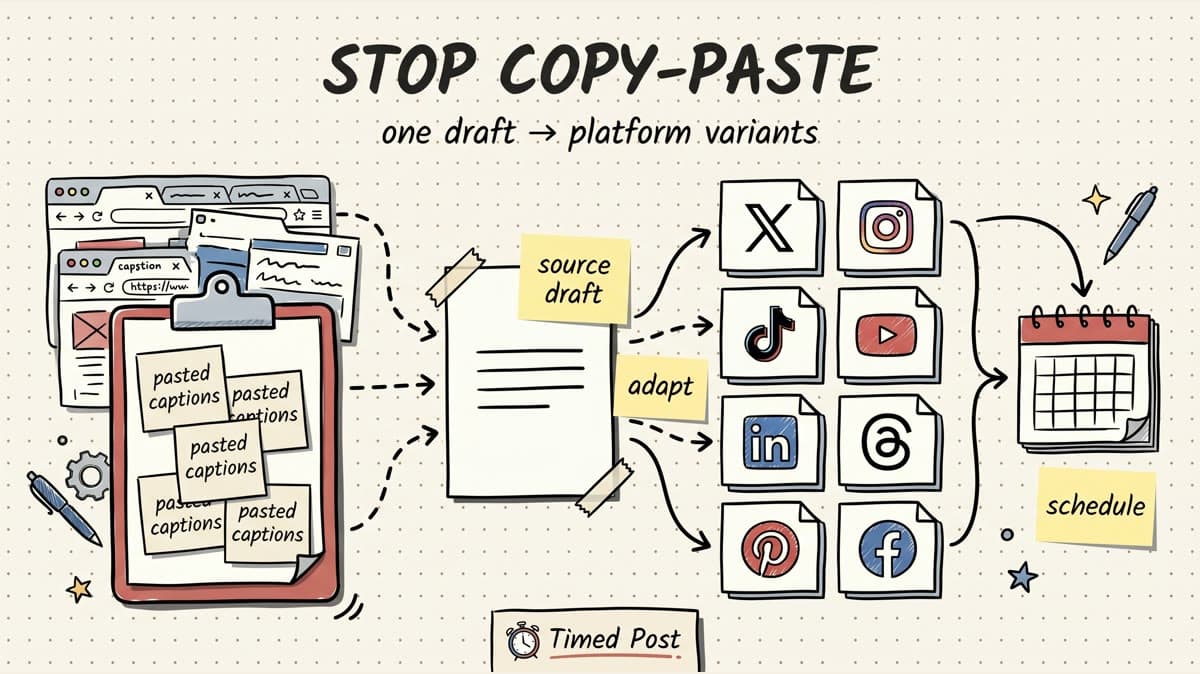
Copy-pasting the same post into every social app feels fast for about ten minutes.
Then the small mistakes start showing up.
A LinkedIn caption lands on X with three paragraphs cut off. A TikTok caption still says “link in bio” when the YouTube Short needs a searchable title. The client version goes to the founder account. The post you thought was scheduled on Facebook is still sitting in a draft tab. By the end of the week, the “simple” posting workflow is just eight browser tabs, fifteen screenshots, and a weird fear that something went live in the wrong place.
The fix is not to write eight completely different posts from scratch. That is too slow.
The fix is to stop treating copy-paste as the workflow.
Use one source draft, turn it into platform-native variants, run a quick pre-publish check, then schedule the variants from one calendar. If you want the pure scheduling setup, read our guide on how to schedule posts to multiple social media platforms at once. This guide focuses on the workflow before scheduling: how to stop copying the same caption everywhere and still move fast.
Quick answer: replace copy-paste with a platform variant workflow
The fastest way to stop copy-pasting social media posts is to build a repeatable variant workflow:
- Write one source draft with the core idea.
- Decide what each platform should do with that idea.
- Rewrite the hook, caption, title, hashtags, and CTA for each platform.
- Save those variants in one scheduler instead of separate native drafts.
- Batch the calendar and review the post status after publishing.
That sounds heavier than copy-paste. In practice, it is lighter because you stop rethinking the same post inside every app.
A good workflow turns “copy this everywhere” into:
- X gets the sharpest short version.
- LinkedIn gets the context and lesson.
- Instagram gets the visual-first caption.
- TikTok gets the native-feeling hook.
- YouTube Shorts gets a searchable title.
- Facebook gets the broader explanation.
- Threads gets the casual conversation starter.
- Pinterest gets the evergreen title and description.
Same idea. Different wrapper.
That is where a multi-platform scheduler helps. Timed Post is built around this exact problem: draft once, adapt per platform, and schedule across X, Instagram, LinkedIn, Facebook, TikTok, YouTube, Threads, and Pinterest from one calendar.
Why copy-paste breaks once you post on 3+ platforms
Copy-paste works when you post occasionally on one or two channels.
It breaks when social media becomes a system.
Here is why.
1. Every platform rewards a different wrapper
The same idea can work on multiple platforms, but the packaging usually should not be identical.
LinkedIn needs a strong first two lines and a useful reason to keep reading. X rewards shorter, more direct writing. TikTok and Reels need a caption that does not feel like a pasted LinkedIn post. YouTube Shorts needs a title people can understand in search and browse. Pinterest wants evergreen wording, not a disposable daily update.
When you paste one universal caption everywhere, you save time upfront and lose performance later.
For strategy, pair this with the multi-platform posting strategy guide. Strategy tells you what each platform is supposed to do. The workflow below makes the execution less messy.
2. Platform limits create silent mistakes
Copy-paste also ignores boring platform constraints.
A caption can be too long. A link preview can look bad. A video format can be fine for one platform and awkward for another. A hashtag stack that feels normal on Instagram can look desperate on LinkedIn. A post can publish on one channel and fail on another because the connected account, media file, or API permission changed.
Before batching a serious campaign, check official docs where it matters, especially for media-heavy posts. TikTok’s Content Posting API docs and YouTube’s Shorts guidance are useful examples because video publishing rules change faster than most blog posts.
You do not need to memorize every limit. You do need a workflow that forces a quick platform check before the calendar fills up.
3. Manual posting hides accountability
The biggest problem with copy-paste is not the writing. It is tracking.
When posts live in native drafts, notes, spreadsheets, and browser tabs, you lose the answer to basic questions:
- Which accounts already got this post?
- Which platform version is approved?
- Which client workspace does this belong to?
- Which post is waiting on a better visual?
- Did TikTok publish or fail?
- Did LinkedIn use the right version?
- What should be reused next week?
If you manage multiple accounts, this gets ugly fast. Our guide on managing multiple social media accounts covers the broader operating system. The short version: once the workflow leaves your head, you need one place where drafts, variants, and schedule status live together.
The 5-step workflow to stop copying posts everywhere
Use this workflow for founder updates, agency client posts, AI creator videos, product launches, newsletter snippets, podcast clips, and weekly content batches.
Step 1: write one source draft, not the final caption
Start with a source draft. This is not the caption you publish everywhere.
It is the clean “master idea” that holds:
- the core point,
- the audience,
- the proof or example,
- the CTA,
- the asset or link,
- the angle you want repeated.
A source draft can be rough. It only needs to be clear enough to adapt.
Example source draft:
We shipped comment management for Instagram and X this week. The hard part was not the UI. It was dealing with different platform permissions, reply behavior, and API edge cases. The lesson: social tools look simple from the outside, but every platform has weird publishing and engagement rules.
That draft should not be pasted everywhere.
It should become different posts.
Step 2: choose the job of each platform
Before rewriting, decide what each platform is supposed to do.
A lot of creators skip this and then wonder why every channel feels like a weaker copy of the same post.
Use this map:
| Platform | Job of the post | What to change before publishing |
|---|---|---|
| X | Start a quick founder/build-in-public conversation | Shorter hook, direct wording, fewer hashtags, optional question |
| Explain the lesson with more context | Strong first two lines, clearer takeaway, less slang, more useful framing | |
| Support the visual or carousel | Caption that matches the image/video, cleaner spacing, fewer external-link assumptions | |
| TikTok | Push discovery around the video hook | Native caption, simple hashtags, no corporate wording |
| YouTube Shorts | Make the video searchable and clickable | Strong title, topic keyword, short description if needed |
| Give broader context for pages/groups | More explanatory wording, less platform-insider language | |
| Threads | Create a lighter conversation | Casual version, simple prompt, minimal formatting |
| Turn the idea evergreen | Search-friendly title, description, board/category fit |
This one decision prevents most lazy cross-posting.
The question is not “where else can I paste this?”
The question is “what job should this idea do on this platform?”
Step 3: create platform variants in one place
Now create the variants.
Do not open eight apps. Do not write one caption in Google Docs and then paste it into native schedulers. Do not rely on screenshots to remember which version is final.
Create the variants inside the same workflow you will use to schedule them.
A practical setup in Timed Post looks like this:
- Create the source draft.
- Select the platforms/accounts.
- Write the platform-specific versions.
- Add the media once.
- Adjust the copy per platform.
- Place the post on the calendar.
- Use workspaces if the post belongs to a client, brand, or separate project.
That is the difference between a scheduler and a clipboard workflow.
A clipboard workflow says: “I hope I pasted the right thing into the right app.”
A scheduling workflow says: “Here are the variants, here are the accounts, here is when each one goes live.”
If you are comparing tools for this, the best multi-platform social media scheduler guide breaks down the category. For execution-heavy teams, also check bulk scheduling because batching is where the time savings really show up.
Step 4: run a 60-second pre-publish QA check
Most copy-paste mistakes are not creative mistakes. They are QA mistakes.
Use this checklist before scheduling:
| Check | Why it matters |
|---|---|
| Account | Avoid posting a client caption to the wrong brand account |
| Platform version | Make sure the LinkedIn version is not going to X or TikTok |
| Hook | Confirm the first line fits the platform feed |
| Length | Catch captions, titles, and descriptions that are too long |
| Media | Check aspect ratio, thumbnail, audio, watermark, and file access |
| Link/CTA | Remove “link in bio” where it does not make sense |
| Time slot | Avoid posting everything at the exact same minute by accident |
| Approval | Confirm client/team review before scheduled publish |
| Status after publish | Check which platforms actually published, not just the top-level post state |
That last line matters.
A post can look “done” from a distance while one platform failed quietly. The safest workflow checks per-platform status after publishing, especially for video posts and multi-account schedules.
Step 5: schedule in batches, then reuse what worked
The point of this workflow is not to make posting feel complicated.
The point is to make batching possible.
Once your source drafts and platform variants live in one calendar, you can batch a week of content without eight native-app sessions. You can drag posts around. You can keep one channel from getting too crowded. You can see whether Tuesday already has three client posts before adding a fourth.
For timing, use our guide to the best times to post on social media as a starting point. Then adjust based on your own analytics. Generic timing is a baseline, not a religion.
A simple weekly rhythm:
| Day | Workflow |
|---|---|
| Monday | Write 5-10 source drafts from product updates, client work, videos, or newsletter ideas |
| Tuesday | Turn the strongest drafts into platform variants |
| Wednesday | Add media, QA, and schedule the calendar |
| Thursday | Review publish status and reply/comment where needed |
| Friday | Check what worked and recycle winning angles for next week |
That is much cleaner than “post whenever I remember, then paste it everywhere at night.”
Example: one product update without the copy-paste mess
Let’s use a real founder-style example.
Source draft:
We added comment management for Instagram and X. It took longer than expected because every platform handles permissions and replies differently. Small feature from the outside, messy platform logic underneath.
Bad copy-paste version:
We added comment management for Instagram and X. It took longer than expected because every platform handles permissions and replies differently. Small feature from the outside, messy platform logic underneath. Check it out.
That same caption is too flat everywhere.
Better platform variants:
| Platform | Better variant |
|---|---|
| X | shipped comment management for ig + x today. looked like a small feature. was not small at all lol. permissions, reply rules, weird platform edge cases. building social tools is basically 30% product and 70% “why does this API work like this?” |
| We shipped comment management for Instagram and X this week. The feature sounds simple from the outside: show comments, let the user reply, keep everything organized. The hard part was platform behavior. Permissions, reply states, and API differences made it much messier than the UI suggested. Building social tools keeps teaching me the same lesson: distribution looks simple until you touch every platform edge case. | |
| New workflow update: Instagram + X comment management is now part of the stack. The goal is simple: less tab switching after posts go live. Posting is only half the work. Replies and comments are where the real follow-up happens. | |
| TikTok | added comment management for ig + x. thought it would be easy. it was not. social platform APIs are a different sport. |
| YouTube Shorts | Building Comment Management for Instagram and X Was Harder Than Expected |
| Threads | tiny product update that was not tiny at all: comment management for ig + x is in progress/rolling out. platform permissions are pain lol |
| Social Media Comment Management Workflow for Founders and Small Teams | |
| We added comment management support for Instagram and X so teams can keep publishing and follow-up closer together. The biggest challenge was handling the different permissions and reply behavior across platforms. |
That is still one idea.
But now each platform gets a version that fits how people use it.
Schedule your posts across every platform
Draft once, publish everywhere — automatically.
No credit card · Cancel anytime
What tool setup works best?
You can stop copy-pasting with different setups. The right one depends on volume.
| Setup | Best for | Where it breaks |
|---|---|---|
| Native apps only | One creator, one or two platforms, low posting volume | Too many tabs once you add clients, brands, or 3+ platforms |
| Spreadsheet + manual posting | Early planning and approvals | The spreadsheet does not publish, verify status, or prevent wrong-account mistakes |
| Notes app + reminders | Personal posting discipline | No shared workflow, no calendar visibility, easy to lose final versions |
| Traditional scheduler | General multi-platform publishing | Some tools still make platform-specific variants clunky or expensive |
| Timed Post | Builders, creators, agencies, and social managers posting across many platforms | Not meant to replace video editing, asset creation, or deep enterprise social listening |
Timed Post is strongest when the asset or idea is already ready and the bottleneck is execution: adapting the post, picking the right accounts, scheduling it, and keeping the calendar clean.
If your bottleneck is still creating the video, use a creation or editing tool first. If your bottleneck is publishing the finished content everywhere without chaos, use a scheduler.
Common mistakes to avoid
Mistake 1: using one universal caption
Universal captions are tempting because they feel efficient.
They usually make the post worse everywhere.
Keep the core idea consistent, but rewrite the wrapper.
Mistake 2: treating platform-native as “write totally new posts”
You do not need eight original posts.
You need one source draft and eight appropriate versions. That is a big difference.
Mistake 3: only optimizing for publish time
Timing matters, but it will not save a lazy cross-post.
A strong LinkedIn post at a decent time beats a pasted TikTok caption at the “perfect” time.
Mistake 4: skipping status checks
Do not assume a multi-platform post fully worked just because one platform published.
Check platform-level results, especially when videos, client accounts, or API-connected profiles are involved.
Mistake 5: not building a reusable system
If you recreate the workflow every week, you are still doing manual work with nicer tools.
Save your platform map, QA checklist, and weekly batching rhythm. That is how the process gets faster.
A simple copy-paste replacement checklist
Use this before every batch:
- One source draft exists for each idea.
- Each platform has a clear job.
- X/Threads versions are shorter and conversational.
- LinkedIn version has a stronger first two lines.
- Instagram/TikTok versions match the visual or video.
- YouTube Shorts title is searchable and specific.
- Pinterest title/description are evergreen.
- Account and workspace are correct.
- Media file is accessible and fits the platform.
- CTA makes sense for the platform.
- Calendar is not overloaded on one day.
- Post-publish status will be checked.
If that feels like too much, that is the point: the checklist is exactly what copy-paste hides.
A good scheduler makes the checklist visible without forcing you to manage it in your head.
Where Timed Post fits
Timed Post is for the moment after the idea exists.
You have the post, video, carousel, link, or product update. Now you need to get it across the right platforms without creating a publishing mess.
Use Timed Post when you want to:
- connect X, Instagram, LinkedIn, Facebook, TikTok, YouTube, Threads, and Pinterest,
- draft once and adapt per platform,
- schedule from a drag-and-drop calendar,
- manage separate workspaces for clients or brands,
- batch posts instead of rebuilding them one at a time,
- review analytics and platform status after publishing.
The real win is not “posting everywhere.”
The real win is posting everywhere without every platform feeling like a rushed duplicate.
If you are still in the planning phase, start with the social media workflows that cut your workload in half. If you already have the content and need to move faster, Timed Post is the execution layer.
FAQ
Is copy-pasting the same post across social media bad?
Copy-pasting is not always bad, but it becomes weak when the same caption ignores platform behavior. The core idea can stay the same. The hook, format, CTA, title, hashtags, and length should usually change for each platform.
What is the fastest way to post to multiple social media platforms without copy-paste?
The fastest repeatable workflow is to write one source draft, create platform-specific variants, schedule them in a multi-platform calendar, and check per-platform status after publishing. This keeps the speed of batching without the mistakes of manual copy-paste.
Should I post the exact same content on every platform?
You can reuse the same idea or media asset, but the exact same wording is rarely ideal. X, LinkedIn, TikTok, Instagram, YouTube Shorts, Facebook, Threads, and Pinterest each need a slightly different wrapper to feel native.
How do agencies avoid posting the wrong caption to the wrong client account?
Agencies should use separate workspaces, clear account labels, approval steps, and a pre-publish QA checklist. The workflow should show which client, account, platform variant, and scheduled time belongs to each post before anything goes live.
Does Timed Post replace native platform tools?
No. Native tools are still useful for platform-only features and final checks. Timed Post is designed to reduce the repeated publishing work across multiple platforms: drafting, adapting, scheduling, batching, and reviewing posts from one calendar.
Final verdict
Copy-paste is not a content strategy. It is a shortcut that turns into a tax once you post on several platforms.
The better system is simple:
- one source draft,
- one platform map,
- one set of variants,
- one QA checklist,
- one calendar,
- one post-publish review habit.
That gives you the speed of repurposing without making every channel feel like a duplicate.
Timed Post exists for that execution layer: draft once, publish everywhere, and keep the whole multi-platform workflow from turning into tab chaos.


