
AI creators do not have a normal content workflow.
A normal creator might write one post, shoot one Reel, and publish it manually. An AI creator can generate ten avatars, twenty hooks, and a week of short-form clips before lunch. The hard part is not always making more content. The hard part is distributing it without turning the rest of the day into upload tabs, caption rewrites, and missed posting windows.
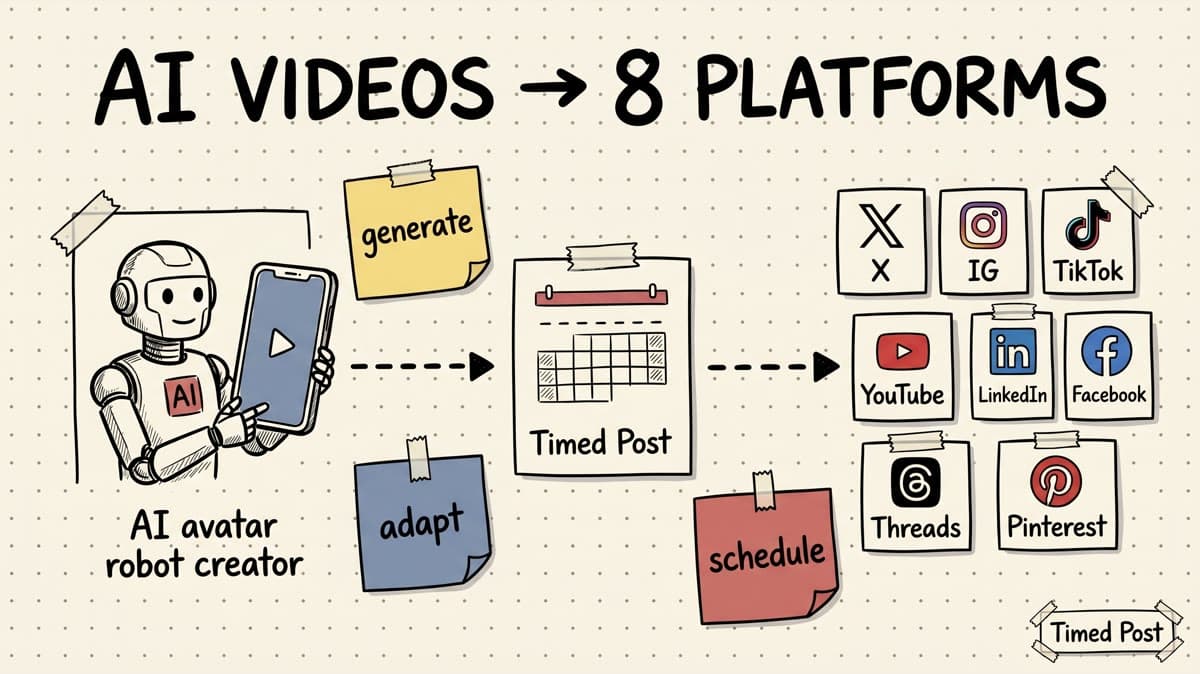
That is why the best social media scheduler for AI creators is not just a calendar. It needs to be the execution layer after generation: one place to take finished AI videos, adapt the wrapper for each platform, schedule the posts, and verify what actually went live.
If you are still comparing the broader category, start with our guide to the best multi-platform social media scheduler. This article is narrower: AI avatar creators, faceless video channels, AI UGC operators, and short-form creators who need to publish the same core asset across TikTok, YouTube Shorts, Instagram Reels, X, LinkedIn, Facebook, Threads, and Pinterest.
Quick verdict
For AI creators, the best scheduler is the one that handles distribution without pretending to be your entire creative stack.
Use a scheduler like Timed Post when:
- your AI video, carousel, image, or text post is already created,
- you want to adapt one idea for several platforms,
- you post on 3+ channels,
- you need a calendar instead of eight native app tabs,
- you want separate workspaces for brands, clients, or channels,
- you care about not publishing the wrong caption to the wrong platform.
Use an AI clipping, editing, or repurposing tool instead when the main bottleneck is still creating the video: cutting long clips, generating subtitles, resizing, translating, or making the avatar asset itself.
The clean stack for most AI creators is:
- generate or edit the asset in your AI/video tool,
- export one clean master version,
- use a scheduler to create platform-native variants,
- batch the calendar,
- check performance and repeat what works.
Timed Post fits step 3 and step 4: draft once, adapt per platform, and schedule across connected accounts from one calendar.
Why AI creators need a different scheduling workflow
AI content creates a weird problem: production gets faster, but publishing does not.
You can make a faceless video with an AI avatar, AI voice, AI script, and AI subtitles. But once the clip is ready, the distribution work still looks painfully manual:
- upload to TikTok,
- rewrite the caption,
- upload to YouTube Shorts,
- write a stronger title,
- upload to Instagram Reels,
- choose a cover frame,
- post the lesson version on LinkedIn,
- post the punchy version on X,
- pin the evergreen version on Pinterest,
- check later which one actually published.
That is the part most AI creator tools under-solve.
A generator can give you assets. A scheduler gives you consistency.
And for AI/video creators, consistency is not just “post every day.” It means keeping the whole distribution system clean:
- which clip goes to which platform,
- which caption version belongs where,
- which account or client owns it,
- which day each asset goes live,
- which platform needs a title instead of a caption,
- which post should be delayed because another launch post is already scheduled.
If that sounds familiar, pair this article with our multi-platform posting strategy guide. Strategy decides what should go where. A scheduler keeps the actual publishing from falling apart.
What to look for in a social media scheduler for AI creators
Do not choose a scheduler only because it says “AI” on the landing page.
Most AI creators need boring operational features more than another prompt box. The scheduler should make high-volume publishing safer, faster, and easier to inspect.
| Feature | Why it matters for AI creators | What to avoid |
|---|---|---|
| Multi-platform publishing | AI creators often test one asset across TikTok, Shorts, Reels, X, LinkedIn, Facebook, Threads, and Pinterest | A tool that only solves Instagram/TikTok and leaves the rest manual |
| Platform-specific copy | The video may be the same, but the caption, title, hook, and hashtag style should change | One universal caption blasted everywhere |
| Calendar view | You need to see the whole week before the posts go live | A queue that hides conflicts until after publishing |
| Workspaces | Useful for separate AI channels, client brands, faceless accounts, or experiments | Mixing personal, client, and brand posts in one messy view |
| Bulk scheduling | High-output creators need batch execution, not one post at a time | Rebuilding each post from scratch |
| Per-platform status | Video posts can fail for account, permission, file, or API reasons | A vague “failed” status that does not tell you which platform broke |
| Analytics | Helps compare which platform or angle is worth repeating | Treating every platform result as equal |
| Approval flow | Useful for AI UGC teams, agencies, and client content | Publishing client-facing content without review |
The key idea: a scheduler should not make AI content feel automated and careless. It should help you make the same core idea feel native on each platform.
The platform map for AI video distribution
AI creators usually start with one vertical asset. That does not mean every platform should receive the same post.
Use this as a practical adaptation map before scheduling.
| Platform | Best AI creator use case | What to adapt before scheduling |
|---|---|---|
| TikTok | Discovery, trend testing, AI avatar clips, faceless hooks | Native-feeling caption, simple hashtags, strong first line, no lazy repost energy |
| YouTube Shorts | Searchable short videos, series, channel growth | Clear title, topic keyword, short description, repeatable posting rhythm |
| Instagram Reels | Visual discovery, creator brand, social proof | Cover frame, first caption line, clean visual formatting, no obvious watermark issues |
| X | Build-in-public updates, clip commentary, founder lessons, quick distribution | Short setup text, opinionated caption, optional thread/quote context |
| B2B lessons, AI workflow breakdowns, agency/client positioning | Strong first two lines, professional context, useful takeaway | |
| Pages, groups, broad community distribution | More explanatory caption, page/group context, less “creator insider” language | |
| Threads | Casual short-form conversation around the idea | Short caption, conversational wording, minimal hashtags |
| Evergreen discovery for tutorials, templates, prompts, workflows | Pin title, description, board fit, vertical visual, search-friendly wording |
For video specs, do not rely on memory. Platform rules change. Before batching a large run, sanity-check official docs such as the TikTok Content Posting API and YouTube Shorts upload guidance. For Instagram-specific planning, our Instagram video length limits guide is a useful internal reference.
Schedule your posts across every platform
Draft once, publish everywhere — automatically.
No credit card · Cancel anytime
Best social media schedulers and tools for AI creators
Here is the honest category breakdown.
Some tools are best when you still need to create or repurpose the content. Others are best when the asset is done and the problem is publishing it everywhere without chaos.
| Tool | Best for AI creators who... | Strength | Tradeoff |
|---|---|---|---|
| Timed Post | already have finished posts/videos and need one calendar for 8 platforms | Multi-platform scheduling, workspaces, bulk scheduling, drag-and-drop calendar, platform adaptation | Not a video editor or avatar generator |
| Buffer | want a simple, familiar scheduler for general creator use | Clean publishing workflow and broad category trust | Less focused on AI/video creator distribution systems |
| Later | care heavily about visual planning, Instagram/TikTok/Pinterest workflows | Strong visual calendar feel | May be more visual-brand-first than AI channel/operator-first |
| Hootsuite | need enterprise social management, approvals, reporting, and team controls | Mature suite for larger teams | Heavy and expensive for solo AI creators or early channels |
| Repurpose.io | want automation from one source channel to other destinations | Strong “repurpose and distribute” positioning | Better for automation flows than hands-on platform-native scheduling |
| quso / vidyo-style tools | need AI clipping, repurposing, subtitles, and creation support | Useful upstream video workflow | Scheduling may be secondary if your main need is calendar control |
| Native apps | post rarely and only care about one platform | Full native features, stickers, sounds, platform-specific controls | Slow and messy when you publish across many platforms |
The practical decision is simple:
- If your bottleneck is making clips, choose a creation/repurposing tool.
- If your bottleneck is distributing finished content, choose a scheduler.
- If you need both, keep the stack split: generation tool for assets, scheduler for execution.
Timed Post is built for the execution layer. It supports X, Facebook, Instagram, Threads, YouTube, TikTok, Pinterest, and LinkedIn, so an AI creator can build one distribution calendar instead of living inside eight publishing tabs.
Example: one AI avatar video turned into eight platform-native posts
Let’s make this concrete.
Say you create a 42-second AI avatar video explaining:
“3 mistakes that make AI UGC ads look fake.”
The lazy workflow is to paste the same caption everywhere.
The better workflow is to treat the video as one asset and the post wrapper as platform-specific.
| Platform | Platform-native wrapper |
|---|---|
| TikTok | “3 tiny things that instantly make an AI UGC ad look fake” |
| YouTube Shorts | “3 AI UGC Mistakes That Make Ads Look Fake” |
| Instagram Reels | “ai ugc can work, but these 3 mistakes make it feel fake fast” |
| X | “most AI UGC ads do not fail because the avatar is bad. they fail because the details feel off.” |
| “I looked at why some AI UGC ads feel fake. The pattern is usually not the avatar — it is the production wrapper.” | |
| “If you are testing AI UGC for a brand, watch for these 3 details before publishing.” | |
| Threads | “ai ugc is getting better but bad hooks still make it feel fake” |
| “AI UGC Ad Checklist: 3 Mistakes to Avoid” |
Same source video. Eight different jobs.
This is why a workflow for managing multiple social media accounts matters even more when AI speeds up production. Without a system, volume just creates more places to make mistakes.
How to use Timed Post for an AI creator workflow
Here is the workflow we would use if we were running an AI avatar channel or faceless short-form content system.
1. Keep one clean master asset
Do not schedule from a downloaded TikTok with a watermark if the same clip is also going to Reels, Shorts, and Pinterest.
Start with a clean master file:
- vertical 9:16 for short-form distribution,
- readable captions or safe-space text,
- no platform watermark,
- clear first three seconds,
- audio you actually have the rights to use,
- export name that makes sense later.
A scheduler can keep publishing organized. It cannot fix a messy source asset.
2. Write one base idea, then make platform variants
Start with the idea:
“AI creators do not need more content. They need a distribution system.”
Then adapt it:
- TikTok: “making AI videos is easy now. posting them everywhere is still painful 😅”
- YouTube Shorts: “Why AI Creators Need a Distribution System”
- LinkedIn: “AI has made content production faster. Distribution is now the bottleneck.”
- X: “ai lowered the cost of making content. it did not remove the cost of posting it everywhere.”
This is the difference between efficient repurposing and spammy cross-posting.
3. Build the week in a calendar, not in your head
A lot of AI creators think they have a content plan because they have a folder full of clips.
That is not a plan.
A plan shows:
- what goes live today,
- what platform gets which version,
- which channel is over-posted,
- which theme repeats too much,
- which client or brand workspace owns the post,
- where a launch, trend, or experiment fits.
Timed Post’s drag-and-drop calendar is useful here because distribution becomes visible. You can move posts before they create collisions.
For high-output creators, this pairs naturally with bulk scheduling. Batch the boring work once, then spend the rest of the week making better assets and replying to people.
4. Schedule around platform behavior
Do not publish everything at the same time just because it is convenient.
A better starting rhythm:
| Platform | Starting test rhythm |
|---|---|
| TikTok | Test evenings, weekends, and trend-relevant windows |
| YouTube Shorts | Keep a steady daily slot so the channel develops rhythm |
| Instagram Reels | Test lunch and evening windows; watch saves and shares |
| X | Post closer to the conversation or founder/operator moment |
| Test weekday mornings and early afternoon for B2B lessons | |
| Think evergreen; schedule around search/seasonality, not just immediacy |
These are starting points, not laws. Your own data should win. Use our best times to post on social media guide for baselines, then replace generic advice with your account-level results.
5. Verify what published
This is not optional for high-volume AI/video workflows.
A video can fail because of:
- file format,
- file size,
- expired account connection,
- platform API limits,
- caption restrictions,
- unsupported placement,
- permission changes,
- platform-specific review behavior.
If you schedule ten posts and only eight publish, you need to know which two failed. A real workflow checks per-platform results instead of assuming the whole batch worked.
This also protects you from duplicate retries. If a tool reports a partial failure, verify the public/platform result before trying again. The worst version of automation is creating accidental duplicate posts because the status message was unclear.
The AI creator scheduler checklist
Before choosing a scheduler, run through this checklist.
| Question | Good answer |
|---|---|
| Does it support the platforms I actually post on? | Yes, especially TikTok, YouTube, Instagram, X, LinkedIn, Facebook, Threads, and Pinterest if you distribute broadly |
| Can I adapt copy per platform? | Yes, not just paste one caption everywhere |
| Can I see a weekly/monthly calendar? | Yes, with enough visibility to catch collisions |
| Can I separate brands or channels? | Yes, through workspaces or similar structure |
| Can I schedule in batches? | Yes, because AI creators often work in production sprints |
| Can I check platform-level publish results? | Yes, especially for video posts |
| Does it pretend to replace my creation stack? | Ideally no. It should be clear whether it is for creation, repurposing, or scheduling |
| Is pricing realistic for an early creator? | Yes. Avoid enterprise tools if you are still validating the channel |
This is why Timed Post is a strong fit for AI creators who already have content assets and need the publishing system around them.
It is not trying to be your AI avatar generator. It is the place you take the content after generation so it actually ships.
When Timed Post is not the right fit
Timed Post is not the right tool if your main problem is:
- generating AI avatars,
- editing long videos into clips,
- adding subtitles,
- translating voiceovers,
- removing backgrounds,
- creating ad variations,
- replacing a full enterprise social suite,
- doing deep social listening or customer support.
Use specialist tools for those jobs.
Then, when the asset is finished, use Timed Post to schedule the distribution plan. The cleanest AI creator stack is not one tool doing everything badly. It is a few tools connected by a clear workflow.
For broader creator operations, our guide on social media workflows that cut workload in half is a useful next read.
Final recommendation
If you are an AI creator posting once a week on one platform, you can survive inside native apps.
If you are building an AI video channel, faceless content system, AI UGC workflow, or creator brand across several platforms, manual posting becomes the bottleneck fast.
The best social media scheduler for AI creators should help you:
- keep one calendar,
- adapt each post per platform,
- avoid wrong-account mistakes,
- batch the repetitive work,
- separate brands or channels,
- verify publishing results,
- spend more time creating and less time uploading.
That is the role Timed Post is built to play.
Create the asset in your AI stack. Bring it into Timed Post. Draft once, adapt the platform versions, and publish everywhere without living in eight tabs.
FAQ
What is the best social media scheduler for AI creators?
The best social media scheduler for AI creators is one that supports multiple platforms, lets you adapt copy per platform, shows a clear calendar, supports batching, and gives platform-level publish visibility. Timed Post is a strong fit when your AI videos or posts are already created and your main problem is distributing them across TikTok, YouTube, Instagram, X, LinkedIn, Facebook, Threads, and Pinterest.
Do AI creators need a scheduler if they already use AI video tools?
Yes, if they post on multiple platforms. AI video tools help create or repurpose the asset. A scheduler handles the execution layer: captions, platform variants, posting times, account selection, calendar visibility, and publishing status. Most AI creators need both parts of the workflow.
Should I post the exact same AI video caption on every platform?
No. The same video can work across several platforms, but the wrapper should change. TikTok needs a native hook, YouTube Shorts needs a clear title, LinkedIn needs context, X needs a punchy setup, and Pinterest needs search-friendly wording. Reuse the asset, not the exact same caption.
Can Timed Post schedule AI videos?
Timed Post can be used to schedule finished video content across connected social accounts. It is not an AI video generator or editor. The best workflow is to create the video in your AI or editing tool, export a clean master asset, then use Timed Post to adapt and schedule the post across platforms.
Which platforms should AI creators post on?
Most AI video creators should test TikTok, YouTube Shorts, Instagram Reels, X, LinkedIn, Facebook, Threads, and Pinterest depending on the audience and content type. Short-form entertainment may lean TikTok/Reels/Shorts. AI workflow or B2B lessons may do better on LinkedIn and X. Evergreen tutorials can work on Pinterest and YouTube.
Is cross-posting bad for AI creators?
Cross-posting is bad when it looks lazy: watermarks, wrong captions, irrelevant hashtags, or platform-inappropriate copy. Cross-posting is useful when you keep a clean master asset and adapt the post for each platform. The goal is platform-native distribution, not copy-paste spam.


