
Instagram does not have a clean button that says "show me everyone I follow who does not follow me back."
That is why people end up doing one of three things: checking accounts manually, downloading their Instagram data, or connecting a follower tracker app and hoping it is not sketchy.
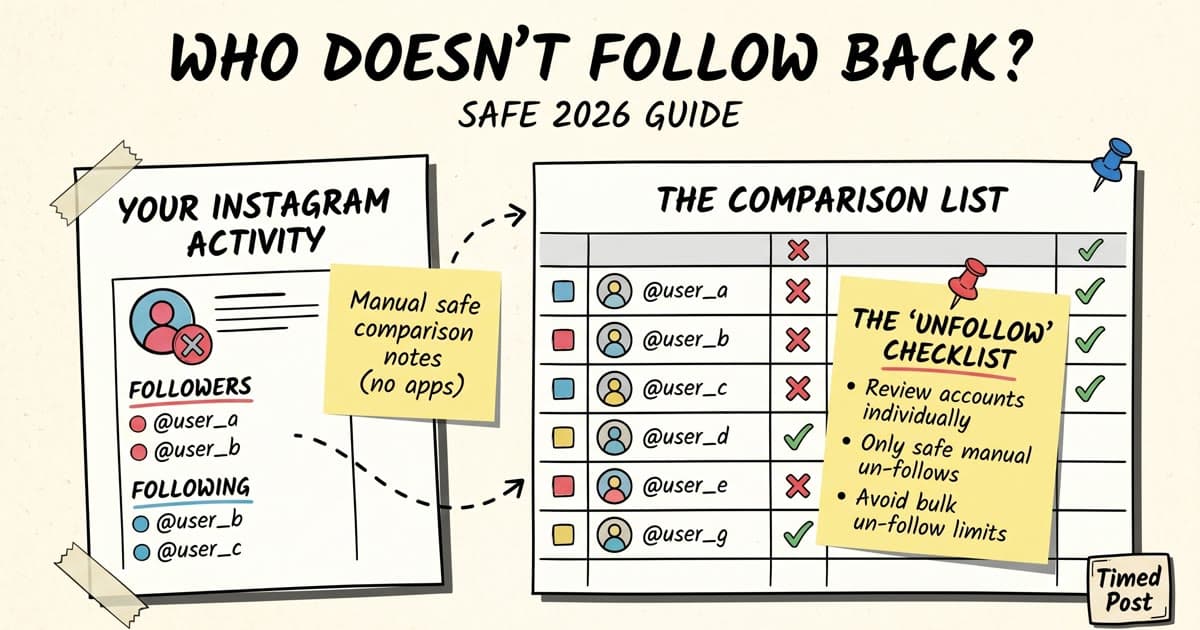
The safe answer is boring, but it works: compare your Following list against your Followers list. If you only follow a small number of accounts, do it inside Instagram. If you follow hundreds or thousands, request your Instagram data and compare the two lists in a spreadsheet. Use follower apps only when you understand what access you are giving them.
quick answer
To see who you follow on Instagram that does not follow you back:
- Open your Instagram profile.
- Tap Following and pick an account you follow.
- Check whether that account appears in your Followers list.
- For a larger account, request your Instagram data from Meta, download your followers and following lists, then compare them in Google Sheets or Excel.
- Avoid apps that ask for your password, promise huge bulk unfollows, or push you to automate follows and unfollows.
Use this rule:
| Situation | Best method | Risk level |
|---|---|---|
| You follow fewer than 100 accounts | Manual check inside Instagram | Low |
| You follow hundreds of accounts | Instagram data download + spreadsheet | Low |
| You want a quick dashboard | Reputable follower tool | Medium |
| You want to bulk unfollow hundreds of accounts | Do not rush it | High |
If you are doing this for a brand account, do not stop at the follow-back list. Clean the account, then fix the posting workflow. Timed Post's guide to scheduling Instagram posts is the better next step once you know who your real audience is.
what you are actually checking
People use a few similar phrases for this, but they are not the same thing.
| Phrase | Meaning |
|---|---|
| Accounts that do not follow back | People you follow, but they do not follow you |
| Unfollowers | People who followed you before, then stopped |
| Fans you do not follow back | People who follow you, but you do not follow them |
| Ghost followers | Accounts that follow you but rarely engage |
This guide focuses on the first one: accounts you follow that do not follow you back.
That does not mean every account on the list is bad. A customer, creator, industry account, competitor, local business, or useful educator can be worth following even if they never follow you. The point is not revenge-unfollowing. The point is cleaning up accounts that add noise and do not help your feed, relationships, or content work.
For a wider cleanup, use Timed Post's guide to Instagram follower management tools after you finish the basic check.
method 1: check manually inside Instagram
Manual checking is slow, but it is the safest option because you do not give another app access to your account.
Use it when you follow a small number of accounts or when you only care about a specific group.
Steps:
- Open Instagram.
- Go to your profile.
- Tap Following.
- Open an account you follow.
- Check whether they appear in your Followers list, or use Instagram's relationship label if it appears on their profile.
- If they do not follow you and you no longer care about their content, write the username down or unfollow them.
- Repeat for the accounts that matter.
Do not try to audit 800 accounts manually in one sitting. Start with obvious groups:
- accounts you followed recently
- accounts you do not recognize
- old growth-sprint follows
- accounts with no recent posts
- accounts that never engage with you
- accounts that make your feed worse
This is enough for most personal accounts. It is not enough for a creator, agency, or brand account with a large following list.
method 2: use Instagram's own following list
Instagram sometimes gives extra sorting options inside the following list, such as accounts you interact with least. These options are not a true follow-back checker. They will not show a perfect list of people who do not follow you back.
They are still useful for cleanup.
Use them like this:
- Go to your Instagram profile.
- Tap Following.
- Review the sorting or category options Instagram shows you.
- Check accounts you rarely interact with.
- Keep accounts you still care about.
- Remove accounts that are only clutter.
This method is best when your real problem is feed quality, not an exact follow-back report.
After cleanup, check whether your content schedule also needs work. If your audience is mostly active at certain hours, use Timed Post's best time to post on Instagram guide instead of randomly posting after every account audit.
Schedule your posts across every platform
Draft once, publish everywhere — automatically.
No credit card · Cancel anytime
method 3: export your Instagram data and compare the lists
This is the best method for larger accounts because it gives you a private, auditable list without handing your login to a random tracker.
Meta explains how to review and request a copy of your Instagram information. Once the export is ready, look for your followers and following data.
The spreadsheet method:
- Download your Instagram data export.
- Open the file that contains accounts you follow.
- Open the file that contains your followers.
- Copy the usernames you follow into column A of a spreadsheet.
- Copy your followers into column B.
- Use a lookup formula to mark accounts in A that do not appear in B.
In Google Sheets, the formula can look like this:
=IF(COUNTIF($B:$B,A2)=0,"not following back","mutual")
Then sort by the new column and review the "not following back" accounts.
This method is not instant. Instagram may take time to prepare the download, and the file format can vary. But it has two big advantages:
- you keep control of the data
- you can make decisions slowly instead of bulk-unfollowing from a random app
If you manage client or brand accounts, save a copy of the spreadsheet before making changes. It gives you a simple audit trail if someone asks why an account was removed.
method 4: use a follower checker app, but be careful
Follower checker apps are faster. They can scan your followers, following, recent unfollows, mutual followers, and accounts that do not follow you back.
The tradeoff is access.
Before you connect any app, check:
- Does it ask for your Instagram password directly?
- Does it use official login or a suspicious login page?
- Can you remove access later?
- Does it push bulk unfollow automation?
- Does it explain what data it stores?
- Are recent reviews full of lockout or action-block complaints?
Meta has a Help Center page for managing privacy settings for apps and websites connected to Instagram. Use it after testing any follower tool so you can remove access if you do not need it anymore.
A safe rule: use third-party tools for reporting, not aggressive automation. A list is useful. A button that unfollows 500 people while you are half paying attention is where problems start.
what to do with the list
Once you have the accounts that do not follow you back, do not unfollow everyone blindly.
Use this filter:
| Keep following if... | Consider unfollowing if... |
|---|---|
| You learn from the account | You do not recognize the account |
| They are a customer, lead, or partner | They have not posted in months |
| They are useful competitor research | Their content makes your feed worse |
| They engage with your content sometimes | You only followed them for a follow-back |
| You genuinely like their posts | They are spam, bots, or irrelevant |
For creators and small brands, the best cleanup is usually gradual. Remove obvious low-value accounts first, then wait. If Instagram starts limiting follow or unfollow actions, stop and come back later.
If you want a more detailed account-cleanup process, read Timed Post's Instagram unfollow tracker guide.
common mistakes to avoid
treating every non-follower as useless
Some one-way follows are normal. You might follow journalists, customers, niche creators, competitors, local businesses, or accounts you use for research. Those accounts can still be worth keeping.
mass-unfollowing too fast
Large bursts of follow and unfollow activity can look spammy. Keep cleanup slow, especially on older brand accounts or accounts connected to client work.
trusting follower-ratio advice too much
A clean following list can make the account feel more intentional, but it will not fix weak content. If your posts are not useful, entertaining, or clear, a nicer ratio will not save them.
giving login access to every tool you find
Follower tools are popular because Instagram does not make this easy. That does not mean every tool deserves your login. If the app feels anonymous, aggressive, or too good to be true, skip it.
forgetting the content workflow after cleanup
Account cleanup is maintenance. Growth still comes from publishing better content more consistently. If you clean your following list but still post randomly, you have only fixed the easy part.
Timed Post's best Instagram schedulers guide can help if your next problem is planning and posting consistently, not follower auditing.
simple weekly cleanup workflow
If you manage an Instagram account for a creator, founder, or client, use a light weekly workflow instead of a chaotic monthly unfollow session.
- Spend 10 minutes reviewing recent follows.
- Check obvious non-follow-backs manually or from your spreadsheet.
- Remove only accounts that clearly no longer matter.
- Note any leads, customers, or creators worth engaging with.
- Plan the next week of posts around the audience you actually want to reach.
That last step matters. Cleaning your following list should make your content work sharper, not turn into another vanity task.
If you are posting across Instagram, TikTok, LinkedIn, X, Threads, Facebook, Pinterest, and YouTube, use Timed Post to batch the next set of posts instead of opening every app separately. Draft the caption once, adjust it per platform, and schedule the batch from one calendar.
For multi-account work, pair this with the guide to managing multiple social media accounts.
common follower management questions
should I unfollow everyone who does not follow me back?
No. Some one-way follows are useful: customers, leads, journalists, creators, competitors, industry accounts, and local businesses. Remove accounts that add noise or look like old follow-for-follow leftovers. Keep accounts that help you learn, research, or build relationships.
can Instagram show a full list of people who do not follow me back?
Not directly. Instagram lets you see your Followers and Following lists, but it does not give you a native "not following back" report. For a small account, check manually. For a bigger account, export your Instagram data and compare the two lists in a spreadsheet.
are Instagram follower checker apps safe?
Some are fine for reporting, but the risk depends on the access they request. Avoid apps that ask for your Instagram password, promise bulk unfollows, or hide how they store data. If you test one, remove access after the audit from Instagram's connected apps settings.
how often should I clean my following list?
For a personal account, once every few months is enough. For a creator, founder, or client account, do a light weekly review of recent follows and obvious clutter. Do not turn cleanup into a daily vanity task. If the account is publishing weak content, a cleaner following list will not fix growth.
final take
The safest way to see who does not follow you back on Instagram is to compare your following list with your followers list.
For a small account, manual checking is enough. For a larger account, Instagram data export plus a spreadsheet is the best balance of privacy and accuracy. Follower checker apps can help, but treat them like temporary audit tools, not something that should control your account.
Once the cleanup is done, move back to the work that actually grows the account: better posts, better timing, and a calmer publishing system.
Try Timed Post if your next problem is scheduling the content, not scrolling through another follower list.


