
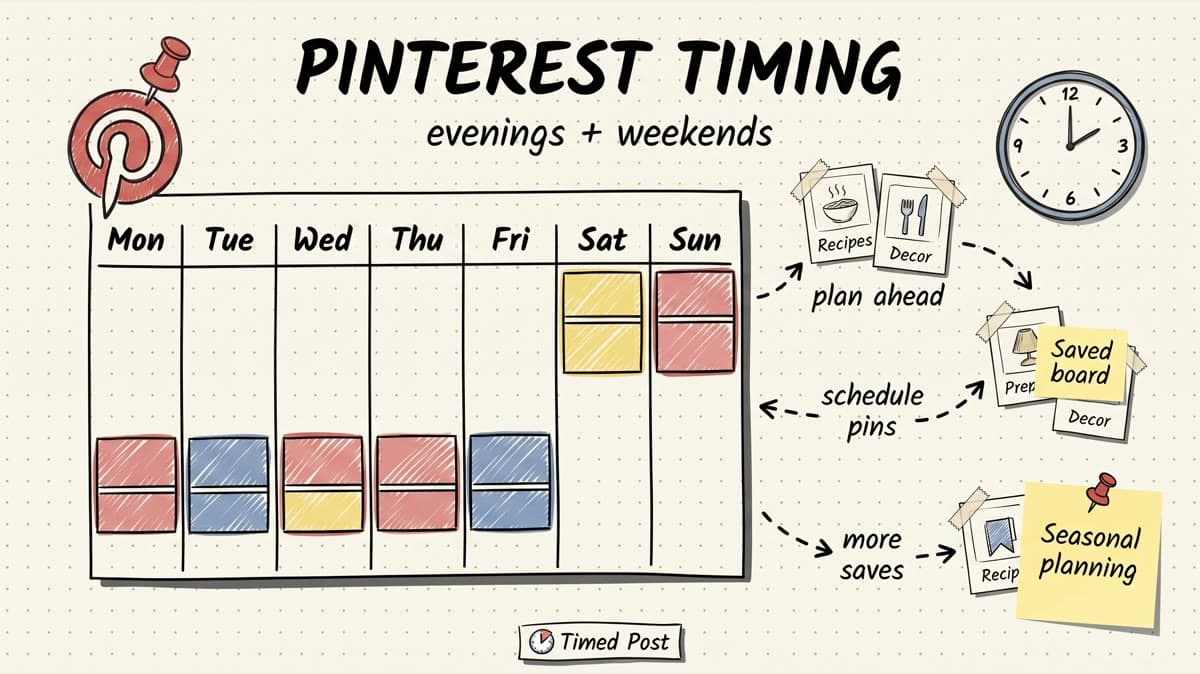
The best time to post on Pinterest in 2026 is usually evening and weekend planning time: Tuesday through Thursday from 8 p.m. to 11 p.m., plus Saturday and Sunday from 10 a.m. to 2 p.m. in your audience's local time.
That is the useful starting point.
But Pinterest does not behave like Instagram, TikTok, or X.
On most social platforms, the first few hours can decide whether a post gets traction. Pinterest is slower. A Pin can be discovered days, weeks, or months after you publish it because people use Pinterest like a search engine, not just a feed.
So the real goal is not “find the one magic hour.” The goal is to publish consistently at moments when people are planning, saving, comparing, shopping, and organizing ideas.
Here is the practical version:
- If you have no Pinterest data yet, start with evening slots from Tuesday to Thursday.
- If you post recipes, lifestyle, travel, fashion, home, wedding, or DIY content, test weekends hard.
- If you post B2B, SaaS, creator, or educational content, test weekday evenings and Sunday planning slots.
- If you post product Pins, test Thursday through Sunday when people are closer to shopping and planning.
- If you manage multiple platforms, do not force Pinterest into the same instant-engagement workflow as X or TikTok. Pinterest needs a longer calendar.
That last part matters.
The annoying part is not knowing that “Wednesday night” can be a good Pinterest slot. The annoying part is turning that into a real workflow when the same campaign also needs Instagram Reels, TikTok videos, YouTube Shorts, LinkedIn posts, Facebook updates, Threads posts, and X posts.
If you need the broader version, read the best times to post on social media guide. This article is the Pinterest-specific version: timing windows, Pin format differences, cadence, seasonal planning, and a simple testing workflow.
Quick answer: best times to post on Pinterest in 2026
Use this as your baseline if you do not have enough Pinterest analytics yet.
| Day | Best starting window | Secondary window | Best for |
|---|---|---|---|
| Monday | 8 p.m.-10 p.m. | 12 p.m.-2 p.m. | Weekly planning, educational Pins, checklists |
| Tuesday | 8 p.m.-11 p.m. | 1 p.m.-3 p.m. | How-to Pins, product research, creator resources |
| Wednesday | 8 p.m.-11 p.m. | 12 p.m.-2 p.m. | Tutorials, list Pins, lead magnets, templates |
| Thursday | 7 p.m.-11 p.m. | 2 p.m.-4 p.m. | Product Pins, weekend planning, lifestyle content |
| Friday | 3 p.m.-6 p.m. | 8 p.m.-10 p.m. | Weekend ideas, shopping, food, travel, local content |
| Saturday | 10 a.m.-2 p.m. | 7 p.m.-10 p.m. | DIY, recipes, home, fashion, travel, events |
| Sunday | 10 a.m.-2 p.m. | 7 p.m.-10 p.m. | Weekly planning, meal prep, routines, saves |
If you want the simplest Pinterest posting schedule, start here:
| Posting frequency | Starter Pinterest schedule |
|---|---|
| 3 Pins/week | Tuesday 9 p.m. + Thursday 8 p.m. + Sunday 11 a.m. |
| 5 Pins/week | Monday 9 p.m. + Tuesday 9 p.m. + Thursday 8 p.m. + Saturday 11 a.m. + Sunday 8 p.m. |
| 1 Pin/day | Use weekday evenings as the core, then rotate weekend morning tests. |
| 2-3 Pins/day | Spread across afternoon, evening, and one weekend/planning slot. |
All times should match the audience you are trying to reach, not the time zone you are working from.
If your ideal buyer is in the US and you are scheduling from Morocco, schedule for the US audience. If you manage client brands in different countries, keep each client in a separate workspace or calendar. That avoids the classic Pinterest mistake: publishing at a convenient time for you instead of a planning time for the person saving the Pin.
Why Pinterest timing is different from other platforms
Pinterest is part social network, part visual search engine, part shopping discovery feed.
That changes how timing works.
On X, timing is about being present when the feed is moving. On TikTok, timing can help the first distribution wave. On LinkedIn, timing can influence early comments. On Pinterest, timing still matters, but searchability, seasonality, keywords, image quality, and save intent matter more.
A Pin can win in three different ways:
- It can get early distribution in the home feed.
- It can rank in Pinterest search for a keyword.
- It can keep getting saves later when the topic becomes seasonal.
That is why Pinterest content should not be treated like a one-day post.
A Pinterest Pin for “summer capsule wardrobe,” “content calendar template,” “meal prep ideas,” or “home office setup” can keep working long after the publish day. The timing window gives it a better launch, but the asset needs to be useful enough to earn saves.
Pinterest's own business resources emphasize that people use the platform to discover ideas and plan purchases, especially when they are considering what to do or buy next. That means your schedule should align with planning behavior, not just “people are bored and scrolling.”
If you are scheduling across multiple channels, put Pinterest inside a broader multi-platform posting strategy. The same campaign might need TikTok at 8 p.m., Instagram at 6 p.m., LinkedIn at 8:30 a.m., and Pinterest on Sunday morning when people are actively planning.
Best day to post on Pinterest
For most brands, the best days to post on Pinterest are Tuesday, Wednesday, Thursday, Saturday, and Sunday.
Weekdays work because people research ideas during quiet evening time. Weekends work because people plan projects, recipes, events, outfits, shopping, and next-week routines.
Here is the practical ranking:
| Rank | Day | Why it works |
|---|---|---|
| 1 | Sunday | Strong for planning, meal prep, routines, DIY, templates, and next-week ideas. |
| 2 | Saturday | Strong for lifestyle, travel, events, home, recipes, fashion, and shopping discovery. |
| 3 | Thursday | Good pre-weekend planning day and useful for product/content discovery. |
| 4 | Tuesday | Reliable weekday evening test day for how-to and educational Pins. |
| 5 | Wednesday | Good all-around day for list Pins, tutorials, and lead magnets. |
| 6 | Friday | Works for weekend topics, but late Friday can be distracted. |
| 7 | Monday | Not bad, but people are often catching up instead of planning deeply. |
This does not mean Monday is useless. It means Monday should not be your only Pinterest test if you have no data yet.
If you only publish three Pins per week, test Tuesday evening, Thursday evening, and Sunday late morning first. That gives you one midweek research slot, one pre-weekend planning slot, and one weekend planning slot.
Best time to post on Pinterest by Pin type
Pinterest timing depends heavily on what kind of Pin you are publishing.
A recipe Pin, a product Pin, a checklist, a SaaS template, a carousel-style idea Pin, and a creator workflow diagram do not all get saved for the same reason.
| Pin type | Best windows to test first | Why |
|---|---|---|
| How-to Pins | Tuesday-Thursday, 8 p.m.-11 p.m. | People have more attention for step-by-step content at night. |
| Product Pins | Thursday-Sunday, 10 a.m.-2 p.m. or 7 p.m.-10 p.m. | People browse and compare products around weekend planning time. |
| Recipe / food Pins | Saturday-Sunday, 10 a.m.-2 p.m.; weekday evenings | Planning meals, grocery lists, and weekend cooking. |
| Home / DIY Pins | Saturday-Sunday morning and afternoon | People save project ideas when they have free time. |
| Fashion / beauty Pins | Thursday-Sunday, afternoon and evening | Outfit planning, shopping, events, and seasonal inspiration. |
| Travel Pins | Sunday evening, Saturday morning | People research trips during planning windows. |
| B2B / creator resources | Tuesday-Thursday evening; Sunday evening | Planning work systems, content calendars, and templates. |
| Seasonal Pins | 30-60 days before peak demand | Pinterest often rewards early planning, not last-minute posting. |
The big Pinterest mistake is publishing seasonal Pins too late.
If you wait until Halloween week to post Halloween ideas, you are late. If you wait until December 20 to post holiday gift ideas, you are late. Pinterest users plan ahead. Your calendar should too.
For most seasonal topics, schedule Pins 30-60 days before the moment. For big shopping, wedding, travel, home, and holiday topics, start even earlier.
Schedule your posts across every platform
Draft once, publish everywhere — automatically.
No credit card · Cancel anytime
Pinterest posting schedule by business type
A good Pinterest schedule should match the business model.
Here are practical starting points.
| Business type | Starter schedule | Best timing focus |
|---|---|---|
| Creator / blogger | 1-3 Pins/day | Weekday evenings + weekend planning slots |
| Ecommerce brand | 1-2 product or idea Pins/day | Thursday-Sunday shopping/planning windows |
| Local business | 3-5 Pins/week | Weekend/event planning and local search behavior |
| Agency managing clients | 3-7 Pins/week per client | Separate calendars by niche and audience time zone |
| SaaS / B2B creator | 3-5 Pins/week | Templates, checklists, workflows, Sunday/weekday evening planning |
| AI creator / video creator | 3-7 Pins/week | Repurpose tutorials, prompt workflows, content systems, templates |
If you are a social media manager, the agency row is the one that matters.
Pinterest becomes messy when you manage several client accounts because every client has a different seasonality curve. A wedding photographer, a skincare brand, a travel creator, and a SaaS founder should not share one generic Pinterest schedule.
That is where a drag-and-drop calendar helps. In Timed Post, the workflow is simple: draft the campaign once, adapt the caption and asset per platform, then place each Pinterest Pin into the right planning window instead of copy-pasting the same post everywhere.
If you are handling multiple brands, pair this guide with how to manage multiple social media accounts and the workflow guide on managing 10 client accounts in 5 hours a week. Pinterest only works when the calendar is organized enough to stay consistent.
The Pinterest timing mistake most teams make
Most teams treat Pinterest like a dumping ground.
They finish a campaign for Instagram, TikTok, or LinkedIn. Then they remember Pinterest at the end and upload a few assets randomly.
That usually creates three problems:
- The Pin goes live too late for the planning cycle.
- The Pin title and description are not written for Pinterest search.
- The Pin is scheduled at whatever time the team happened to upload it.
That is not a Pinterest strategy. That is leftover content recycling.
A better workflow looks like this:
| Step | Bad workflow | Better workflow |
|---|---|---|
| Campaign planning | “Post everywhere tomorrow” | Map platform timing before the campaign starts. |
| Pinterest asset | Reuse a random square image | Create a vertical/search-friendly Pin asset. |
| Caption | Copy Instagram caption | Write a keyword-led Pin title and description. |
| Timing | Publish immediately | Schedule during evening/weekend planning windows. |
| Seasonality | Post when the holiday arrives | Schedule 30-60 days before demand peaks. |
| Tracking | Look once after a day | Review saves, outbound clicks, and long-tail performance. |
Pinterest rewards the boring operational stuff: consistent publishing, clear keywords, useful visuals, and early seasonal planning.
If your current workflow is seven browser tabs and a spreadsheet, read social media workflows that cut workload in half. Pinterest is exactly the kind of platform where workflow debt becomes visible.
How to find your own best time to post on Pinterest
Use the timing windows above as your starting point, then test your own account.
Do not treat generic benchmark data as the truth forever.
Here is a simple four-week test.
Week 1: Set your baseline
Choose three posting windows:
- Tuesday 9 p.m.
- Thursday 8 p.m.
- Sunday 11 a.m.
Publish similar-quality Pins across those windows. Do not compare a weak asset on Tuesday against your best asset on Sunday and call it a timing test.
Track:
- impressions
- saves
- outbound clicks
- profile visits
- top boards or topics
- Pin format
- keyword/theme
Week 2: Add one format variable
Keep the same timing windows, but test Pin types.
For example:
- one how-to Pin
- one checklist Pin
- one product/resource Pin
- one seasonal Pin
This tells you whether timing or content type is doing more of the work.
Week 3: Add weekend and afternoon tests
Add Saturday 11 a.m. and Thursday 2 p.m.
This matters because some niches have strong daytime planning behavior. Home, food, wedding, travel, fashion, and local businesses often need weekend tests, not just weekday nights.
Week 4: Build your repeatable calendar
Keep the winners and turn them into a schedule.
A simple result might look like this:
| Slot | Use it for |
|---|---|
| Tuesday 9 p.m. | Tutorials and educational Pins |
| Thursday 8 p.m. | Product/resource Pins |
| Saturday 11 a.m. | Lifestyle and seasonal Pins |
| Sunday 8 p.m. | Weekly planning and checklist Pins |
After four weeks, you will have a better answer than any generic article can give you.
The point is not to be perfect. The point is to stop guessing.
How Timed Post fits into a Pinterest schedule
Timed Post is useful for Pinterest because Pinterest is not just “post now and move on.”
It needs planning.
A realistic campaign might look like this:
| Platform | Timing logic |
|---|---|
| Weekday morning for work attention | |
| X | Several short posts around active conversation windows |
| Evening scroll time for Reels or carousels | |
| TikTok | Evening entertainment window |
| YouTube Shorts | Afternoon/evening discovery window |
| Midweek Page or Group timing | |
| Threads | Conversation-based posting window |
| Evening/weekend planning window, often scheduled ahead |
The campaign is the same, but the platform logic is different.
That is why “draft once, publish everywhere” should not mean “same copy, same time, same asset.” It should mean one central campaign, then platform-specific edits and timing.
Timed Post gives you the calendar layer for that: draft once, adapt per platform, schedule the Pinterest Pin for the right planning window, and keep the rest of the campaign organized around it.
If you are building a bigger system, start with the best multi-platform social media scheduler guide or the bulk scheduling workflow. Pinterest is much easier when it is part of one planned calendar instead of a random afterthought.
Pinterest timing checklist
Use this before you schedule your next batch.
- Is the Pin useful enough to earn saves, not just impressions?
- Does the title include the actual keyword someone would search?
- Is the asset vertical and readable on mobile?
- Is the Pin scheduled before the seasonal peak, not during it?
- Did you choose a planning window, not just your own working hour?
- Are you separating Pinterest timing from Instagram/TikTok timing?
- Are you tracking saves and outbound clicks, not just impressions?
- Are client accounts separated by niche, time zone, and seasonality?
If you can check those boxes, your Pinterest schedule is already better than most teams treating it like a content leftovers folder.
FAQ
What is the best time to post on Pinterest?
The best time to post on Pinterest is usually Tuesday through Thursday from 8 p.m. to 11 p.m., plus Saturday and Sunday from 10 a.m. to 2 p.m. in your audience's local time. Use those as starting windows, then test against your own Pinterest analytics.
What is the best day to post on Pinterest?
The best days to post on Pinterest are often Sunday, Saturday, Thursday, Tuesday, and Wednesday. Weekends work well because people plan projects, meals, shopping, travel, and next-week routines. Weekday evenings work well because people have more time to research and save ideas.
Is Pinterest better in the morning or evening?
Pinterest often performs well in the evening because people use it during planning and browsing time after work. Weekend mornings can also work well, especially for recipes, DIY, home, fashion, travel, local, and lifestyle content.
How often should I post on Pinterest?
A good starting point is 3-5 Pins per week if Pinterest is a secondary channel, or 1-3 Pins per day if Pinterest is a major traffic channel for your brand. Consistency matters more than one perfect posting time.
Should I post seasonal Pinterest content early?
Yes. Pinterest users plan ahead, so seasonal Pins should usually be scheduled 30-60 days before the peak moment. For major holidays, shopping seasons, weddings, travel, and home projects, earlier planning can work even better.
Can I schedule Pinterest posts with Timed Post?
Yes. Timed Post supports multi-platform scheduling across Pinterest and other major social platforms, so you can plan Pinterest Pins inside the same calendar as Instagram, TikTok, LinkedIn, Facebook, YouTube, Threads, and X.
Does the same posting time work for Pinterest and Instagram?
Not always. Instagram timing is usually built around feed and Reels engagement. Pinterest timing is built around planning, search, saves, and seasonal discovery. The same campaign can be reused, but the timing and format should be adapted for each platform.
Final take
The best time to post on Pinterest in 2026 is not one magic hour.
Start with weekday evenings and weekend planning windows. Then test your own account by Pin type, topic, audience time zone, and seasonality.
For most teams, the bigger win is operational: stop treating Pinterest as the last platform in the copy-paste chain. Give it its own timing logic, schedule seasonal content early, and track saves and outbound clicks over time.
That is how Pinterest becomes a long-tail traffic channel instead of another tab you forgot to update.


