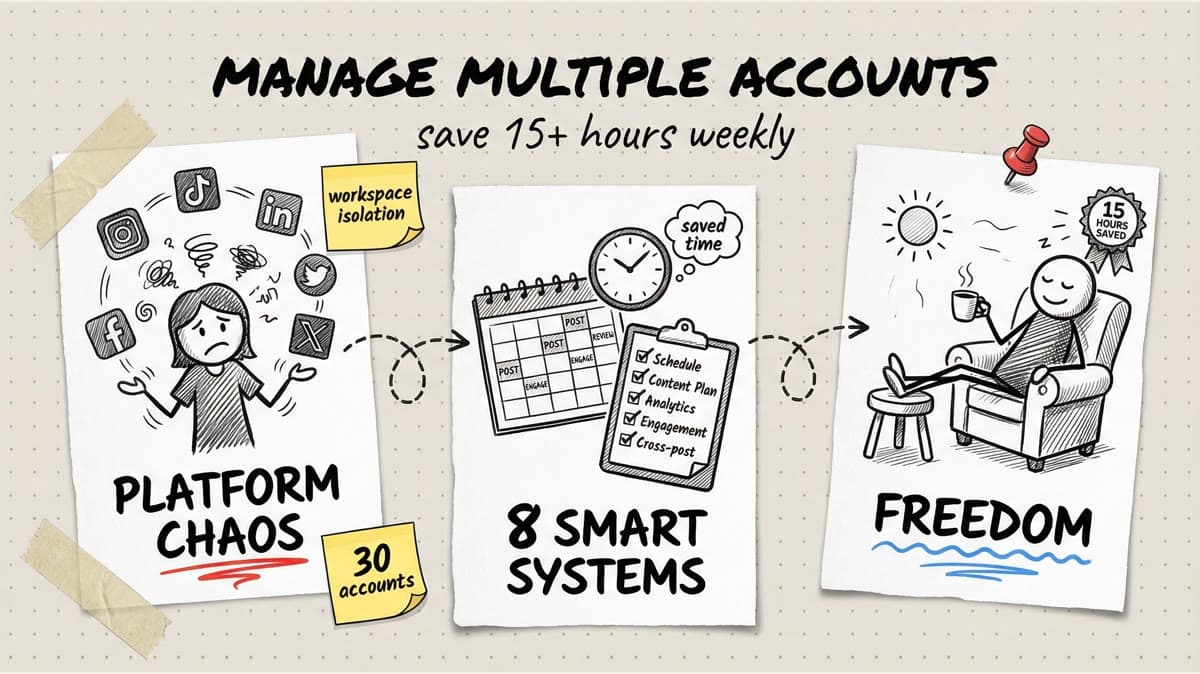
Managing multiple social media accounts isn't just time-consuming. It's a productivity black hole that swallows entire workdays if you're not strategic.
Between switching platforms, remembering different brand voices, tracking what's posted where, and manually publishing at optimal times, agencies and social media managers easily burn 20-30 hours per week on tasks that could be automated.
The brutal math: If you're managing 5 client accounts across 4 platforms each, that's 20 separate logins, 20 different content calendars to track mentally, and hundreds of manual posts per month. No wonder social media managers report burnout rates 40% higher than other marketing roles.
But here's the thing: most of that time isn't creating great content. It's navigating between tools, re-entering the same information across platforms, and doing repetitive admin work that doesn't move the needle.
This guide breaks down 8 proven strategies that reclaim 15+ hours per week for teams managing multiple accounts. These aren't theory or "productivity hacks." They're workflows used by agencies managing 20+ clients without hiring extra staff.
Quick wins you'll learn:
- How to cut platform-switching time by 80% (Strategy 1)
- The 2-hour batching session that covers an entire week of posts (Strategy 3)
- Why most teams waste 5+ hours per week on redundant work (Strategy 4)
- The approval workflow that prevents bottlenecks and saves 3 hours weekly (Strategy 6)
Why Multi-Account Management Destroys Productivity
Before diving into solutions, let's measure the damage. Here's what managing 5 accounts across Instagram, LinkedIn, Facebook, and TikTok looks like without a system:
| Task | Time Per Account | Total (5 Accounts) | Weekly Total |
|---|---|---|---|
| Platform logins/switching | 3 min/day | 15 min/day | 1.75 hours |
| Manual posting | 5 min/post × 5 posts | 125 min/week | 10.4 hours |
| Caption writing from scratch | 10 min/post | 250 min/week | 20.8 hours |
| Hashtag research | 5 min/post | 125 min/week | 10.4 hours |
| Analytics checking | 15 min/account | 75 min/week | 1.25 hours |
| Client reporting | 30 min/account | 150 min/week | 2.5 hours |
Total weekly time: 47+ hours
That's more than a full-time job spent on administrative tasks before you even think about strategy, engagement, or creative development.
The strategies below bring that number down to 8-12 hours per week for the same output. Here's how.
1. Centralize Everything in One Dashboard
The platform-hopping tax is real. Every time you switch from Instagram to LinkedIn to TikTok, you lose:
- 2-3 minutes logging in or switching accounts
- Context about what content is scheduled where
- Mental energy re-orienting to a different brand voice
Across a day managing 5 accounts on 4 platforms, that's 30-45 minutes burned on navigation alone. Per week? 3-5 hours just clicking around.
The fix: Unified multi-platform dashboards
Instead of juggling native apps, manage all accounts from one interface. You get:
- Single login for all platforms (Instagram, TikTok, LinkedIn, Facebook, X, YouTube, Threads)
- Account switcher that takes one click, not 15
- Workspace separation so Client A's content never mixes with Client B's
- Unified content library where assets are accessible across all accounts
Timed Post supports 15 accounts on Growth and unlimited accounts on Premium, with workspaces, letting you isolate brands or group them by client. When you're drafting a post, you select which accounts get it. One interface, zero platform-hopping.
Real-world impact:
Before centralization: 45 minutes/day switching platforms
After: 5 minutes/day navigating workspaces
Time saved: 3-4 hours/week
2. Use Workspaces to Prevent Cross-Posting Disasters
Here's a nightmare scenario every agency has lived: You write a killer LinkedIn post for Client A's professional services brand, click publish, and realize too late you posted it to Client B's meme-heavy TikTok account.
The root cause isn't carelessness. It's cognitive overload from managing too many accounts in one chaotic feed.
The fix: Workspace isolation
Create separate workspaces for each client or brand cluster:
- Workspace 1: Client A (LinkedIn, Instagram, Facebook)
- Workspace 2: Client B (TikTok, Instagram, X)
- Workspace 3: Personal brand (LinkedIn, X)
Within each workspace, you only see that client's accounts, content calendar, and drafts. No more scrolling past 10 other brands to find the right one.
Workspace workflow in practice:
- Log in Monday morning
- Switch to "Client A" workspace
- Batch-create and schedule the week's content
- Switch to "Client B" workspace
- Repeat
Each workspace maintains its own brand voice, visual style, and content strategy. You're never mixing up tone or accidentally cross-posting.
Bonus: Client collaboration
Some tools let you invite clients into their workspace as view-only or approval-only users. They can review drafts and approve posts without needing full platform access.
Time saved: 1-2 hours/week (from fixing mistakes and preventing review cycles)
3. Batch Content Creation in 2-Hour Blocks
Most social media managers create content reactively: "It's Tuesday, better post something." This approach guarantees you'll spend 30-60 minutes every single day scrambling for ideas and designing graphics.
The batching alternative:
Block 2-3 hours once per week. In that session, create an entire week (or month) of content for all accounts at once.
Why batching is 3x faster:
- No context switching: You stay in "creative mode" instead of bouncing between tasks
- Template reuse: Design one carousel template, swap text 5 times
- Momentum: Ideas flow faster when you're warmed up
Batching session structure (2 hours for 5 accounts, 25 posts total):
| Time Block | Task | Output |
|---|---|---|
| 0-20 min | Review content calendar, identify gaps | Week's posting schedule confirmed |
| 20-40 min | Write all captions (AI-assisted) | 25 captions drafted |
| 40-70 min | Design graphics in Canva (reuse templates) | 25 graphics created |
| 70-100 min | Upload to scheduler, assign to accounts | 25 posts scheduled |
| 100-120 min | Review, adjust timing, add hashtags | Week complete |
Compare this to daily posting:
- Daily approach: 30 min/day × 7 days = 3.5 hours
- Batching: 2 hours once
Time saved: 1.5 hours/week (and that's conservative)
Timed Post
Schedule your posts across every platform
Draft once, publish everywhere — automatically.
No credit card · Cancel anytime
Schedule your posts across every platform
Draft once, publish everywhere — automatically.
No credit card · Cancel anytime
4. Stop Writing Captions From Scratch
Writing captions is where most time vanishes. Staring at a blank screen, second-guessing tone, rewriting three times, and then realizing you need to write four more captions for different platforms.
If you're spending 10-15 minutes per caption, that's 2+ hours per day just on text.
The fix: AI-assisted caption generation
Modern AI tools (like Timed Post's AI Studio) don't replace your creativity. They give you a 80% first draft in 30 seconds. You refine, add brand voice, and publish.
How to use AI captions effectively:
- Upload your image or video
- Give the AI context: "LinkedIn post about hiring, professional tone, include a question"
- Get 3-5 caption variations instantly
- Pick the best one, tweak it, done
What AI handles well:
- Hook sentences that grab attention
- Hashtag suggestions based on content
- Platform-specific tone adjustments (formal LinkedIn vs casual Instagram)
- Emoji placement
What you still control:
- Final voice and brand personality
- Strategic messaging
- Specific CTAs or offers
Time math:
- Manual captions: 10 min/post × 25 posts = 4.2 hours/week
- AI-assisted: 2 min/post × 25 posts = 50 minutes/week Time saved: 3+ hours/week
5. Cross-Post Strategically (Not Lazily)
Here's a common trap: "I'll just post the same content to all platforms to save time."
Bad idea. Instagram carousels flop on LinkedIn. TikTok vertical videos look awkward on Facebook. Identical captions everywhere scream "I don't care about this platform."
But smart cross-posting? That saves massive time.
The smart cross-posting framework:
Create one piece of pillar content (blog post, long video, podcast), then adapt it for each platform with minimal extra work.
Example: One blog post becomes 8 platform-native posts
| Platform | Format | Adaptation Time |
|---|---|---|
| Text post (key takeaway) | 3 min | |
| Carousel (5 tips from post) | 10 min | |
| TikTok | 60-sec talking head summary | 15 min |
| X | Thread (main argument broken down) | 8 min |
| Link share with excerpt | 2 min | |
| YouTube | Short clip from video version | 5 min |
| Infographic of framework | 12 min | |
| Threads | Quick insight as conversation starter | 3 min |
Total adaptation time: ~58 minutes for 8 posts
If you created 8 totally original posts from scratch? 4-6 hours minimum.
Cross-posting rules:
- Adjust format to fit platform norms (square for Instagram, vertical for TikTok)
- Rewrite captions for each platform's tone (professional on LinkedIn, casual on Instagram)
- Change CTAs based on platform behavior (LinkedIn: "Read full article," TikTok: "Follow for part 2")
Tools like Timed Post let you duplicate a post and tweak it per platform in one workflow. You're not starting from zero each time.
Time saved: 3-4 hours/week
6. Implement Approval Workflows That Don't Block You
If you work with clients or team leads who need to approve posts before publishing, you know the bottleneck: send draft, wait 24-48 hours, get vague feedback ("can we make it pop more?"), revise, wait again.
This approval hell can add 5-10 hours per week in delays and back-and-forth.
The fix: Built-in approval workflows
Modern scheduling tools include:
- Drafts with approval status (Pending, Approved, Needs Changes)
- Comment threads on each post for feedback
- Role-based permissions (editors can create, admins can approve)
- Notification systems so approvers know when drafts are ready
How it works in practice:
- You create Monday's batch of 10 posts
- Mark them "Ready for Review"
- Client gets notified, reviews all 10 in one sitting
- Approves 8, comments on 2 ("Change the CTA on this one")
- You fix those 2, resubmit
- Client approves
- All 10 auto-publish on schedule
Compare this to the email/Slack chaos:
Old way: Screenshots sent via email → buried in thread → "Did you see my revision?" → lost feedback → start over
New way: Everything lives in the scheduler with status tracking and version history
Time saved: 3-5 hours/week (from eliminating revision confusion and delay)
7. Automate Repetitive Tasks
Certain social media tasks are pure repetition: adding the same hashtag groups, applying brand colors, posting recurring content (Monday motivation, Friday tips).
Stop doing these manually.
What to automate:
a) Hashtag sets
Save groups of 15-20 hashtags per content type:
- "Product launch" hashtags
- "Educational content" hashtags
- "Behind-the-scenes" hashtags
When creating a post, click the saved set instead of typing 20 hashtags.
b) Recurring post templates
If you post a "Tip Tuesday" every week, save the template. Next Tuesday, duplicate it, swap the tip text, schedule. Done in 90 seconds.
c) Content queues
Some tools let you create a queue of evergreen posts and auto-fill empty calendar slots. If you skip a day, the system posts something instead of leaving a gap.
d) First comment scheduling
Instagram doesn't allow links in captions, so you drop them in the first comment. Schedule that comment to auto-post 30 seconds after the main post.
Time saved from automation:
- Hashtag typing: 5 min/post × 25 posts = 2 hours/week → becomes 10 min total
- Recurring posts: 10 min/post × 4 posts = 40 min/week → becomes 6 min total
Total time saved: 2-3 hours/week
8. Consolidate Reporting With Unified Analytics
If you manage 5 accounts, manual reporting looks like this:
- Log into Instagram → screenshot insights → save
- Log into TikTok → pull analytics → save
- Log into LinkedIn → export data → save
- Log into Facebook → copy metrics → save
- Open Google Sheets → paste everything → format
- Write summary analysis
- Send to client
Time per reporting cycle: 2-3 hours
If you report weekly, that's 8-12 hours/month just pulling numbers.
The fix: Unified dashboards with automated reports
Connect all accounts once. Analytics pull automatically into one view showing:
- Follower growth across all platforms
- Top-performing posts by engagement
- Best posting times per platform
- Engagement trends (likes, comments, shares)
Generate PDF reports with one click. Customize which metrics clients see.
Reporting workflow after automation:
- Open dashboard
- Select date range
- Review top posts (5 min)
- Click "Generate Report"
- Add 2-3 sentences of analysis
- Send
New time per reporting cycle: 20-30 minutes
Time saved: 2-3 hours/week
The Compound Effect: How These 8 Strategies Stack
Each strategy saves meaningful time. Combined, they're transformative.
| Strategy | Weekly Time Saved |
|---|---|
| Centralized dashboard | 3-4 hours |
| Workspace isolation | 1-2 hours |
| Content batching | 1.5 hours |
| AI-assisted captions | 3 hours |
| Smart cross-posting | 3-4 hours |
| Approval workflows | 3-5 hours |
| Task automation | 2-3 hours |
| Unified analytics | 2-3 hours |
| Total | 19-26.5 hours |
Realistically, there's overlap (batching includes scheduling, cross-posting feeds into your workflow). Conservative estimate: 15-20 hours saved per week.
That's half a full-time job returned to you for strategy, client growth, or actually having a life outside social media management.
Where to Start
Don't try to implement all 8 at once. Pick based on your biggest pain point:
Drowning in platform-switching? → Start with Strategy 1 (centralized dashboard)
Clients keep rejecting posts? → Start with Strategy 6 (approval workflows)
Spending hours writing captions? → Start with Strategy 4 (AI captions)
Managing too many accounts? → Start with Strategy 2 (workspaces)
Most teams start with centralized dashboards + batching + AI captions and report saving 8+ hours in the first week.
The key insight: Social media management isn't about working harder. It's about removing friction from repetitive tasks so your time goes to strategy, creativity, and growth, not administrative busywork.
Start a 7-day Timed Post trial at timedpost.com and manage 15 accounts on Growth, or unlimited accounts on Premium, across Instagram, TikTok, LinkedIn, Facebook, X, YouTube, Threads, and Pinterest from one dashboard.